TL;DR |
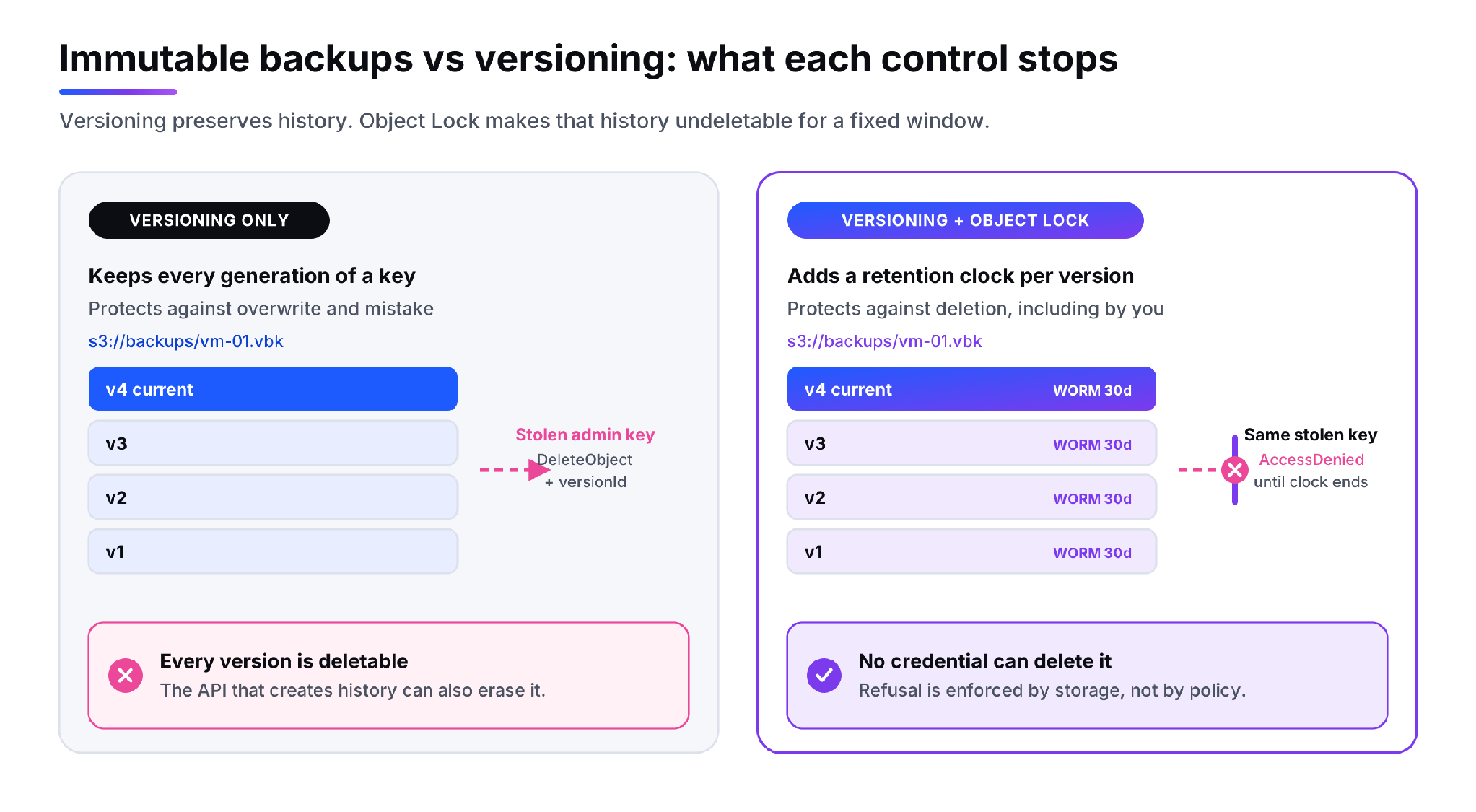 *Figure 1. Versioning preserves history. Object Lock makes that history undeletable for a fixed window.*
---
## **What Immutability Actually Does**
Immutability is enforced through S3 Object Lock. It applies a write-once-read-many retention period to a specific object version, and while that period runs the storage layer rejects overwrite and delete requests against the version no matter which identity sends them. The refusal happens below the permission model rather than inside it, which is the whole point. You are not trusting a policy document to hold; you are relying on the storage service to say no.
Two constraints shape the deployment. Object Lock is enabled when the bucket is created and not afterwards, and enabling it switches versioning on in a way that cannot be suspended. So immutability is not a setting you flip on an existing backup target. It is a decision made at bucket creation time, which in practice means standing up a new bucket and repointing the backup job at it. Teams discover this at the worst possible moment, usually during an audit.
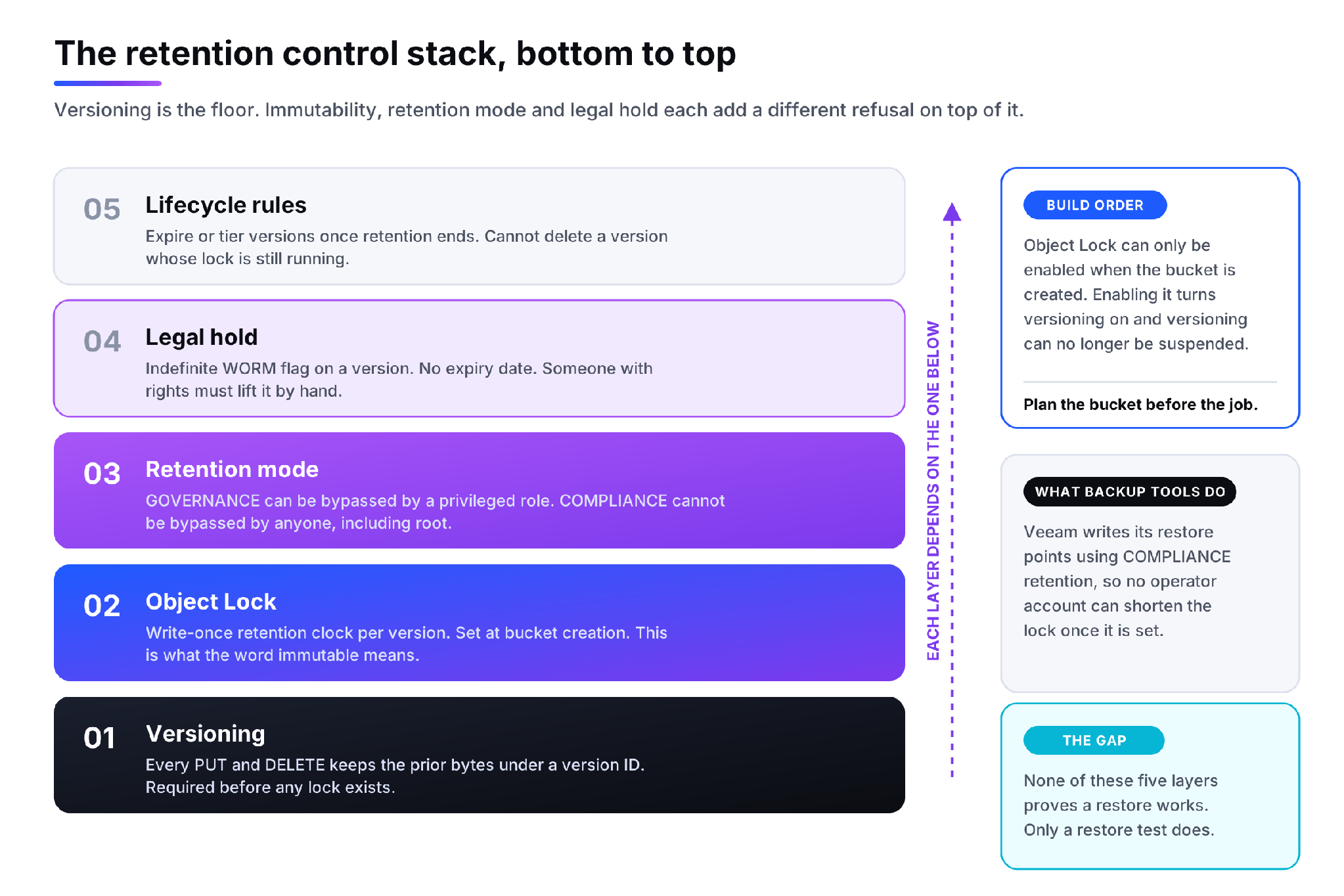 *Figure 2. Versioning is the floor. Immutability, retention mode and legal hold each add a different refusal on top of it.*
**Retention mode decides who can override the lock**
A retention lock carries a mode, and the mode is the part that matters for threat modelling.
Governance mode protects the version from ordinary identities but allows an identity holding s3:BypassGovernanceRetention to shorten the lock or delete early. That is useful when a misconfigured job writes six months of retention onto a test bucket and someone has to clean it up. It is also exactly the capability an attacker will look for once they have administrative access.
Compliance mode has no bypass. Once a version is written with a compliance retention date, nobody can shorten it or delete the version before that date, including the account root. This is the mode backup vendors standardise on: Veeam [writes restore points to S3 compatible object storage in compliance mode](https://helpcenter.veeam.com/docs/agentforwindows/userguide/backup_immutability.html) rather than leaving the choice to the operator, precisely so that no console session can undo it.
**Legal hold is the open-ended case**
A legal hold is a flag on an object version with no expiry date. It holds the version in WORM state until a user with the right permission removes it by hand, and it survives the expiry of any retention period running alongside it. Use it for investigations and litigation, where the end date is unknown when the hold starts.
Lifecycle rules sit above all of this and interact with it directly. A lifecycle expiry cannot remove a version whose retention has not elapsed, so the two policies have to be designed together. Set a 30-day lifecycle against a 90-day lock and the rule simply fails every night until the lock clears.
---
## **Immutable Backups vs Versioning: The Differences That Matter**
| | **Object versioning** | **Object Lock immutability** |
| --- | --- | --- |
| **Primary failure covered** | Overwrite, accidental delete, bad job output | Deliberate deletion, including by an administrator |
| **Who can still destroy data** | Anyone with s3:DeleteObjectVersion | Nobody, under compliance retention |
| **Where it is enabled** | Any time, on any bucket | Bucket creation only, and permanent |
| **Effect of a stolen admin key** | Full history can be erased | Locked versions survive the whole incident |
| **Retention control** | Lifecycle rules, which are editable | Retention date per version, plus optional legal hold |
| **Storage cost behaviour** | Grows with every version until lifecycle clears it | Grows and cannot be trimmed early, so sizing errors are expensive |
| **What it proves to an auditor** | That history exists | That history could not have been altered |
Read the cost row carefully, because it is the trade-off people underestimate. Under compliance mode, a retention period set too long is not a configuration mistake you can reverse. You pay for those bytes until the clock expires. Model the retention window against the data volume before the first job runs, not after.
---
## **A Ransomware Recovery Scenario**
The sequence is consistent enough to plan against. Initial access lands somewhere unglamorous, often a workstation. Over the following weeks the operator moves laterally and collects credentials, and the backup infrastructure is a priority target rather than an afterthought. The backup server holds service account keys, the repository endpoint and the bucket name, all in one place. Only once the backups are dealt with does the encryption payload run, because an intact restore point turns a ransom demand into an inconvenience.
With versioning alone, the delete calls succeed. Every version ID is enumerable and every one of them goes. The incident response team then falls back to whatever sits outside the compromised credential boundary, which usually means tape, and the recovery time stretches into weeks.
With compliance-mode Object Lock and a 30-day retention window, the same calls return an access error. Every restore point written during the intrusion is still there, so the newest clean copy is hours old rather than weeks old. The recovery becomes a scheduling problem instead of a negotiation.
One detail decides the outcome. The retention window has to be longer than the time it takes you to notice. An intrusion that sits quiet for three weeks defeats a seven-day lock. |
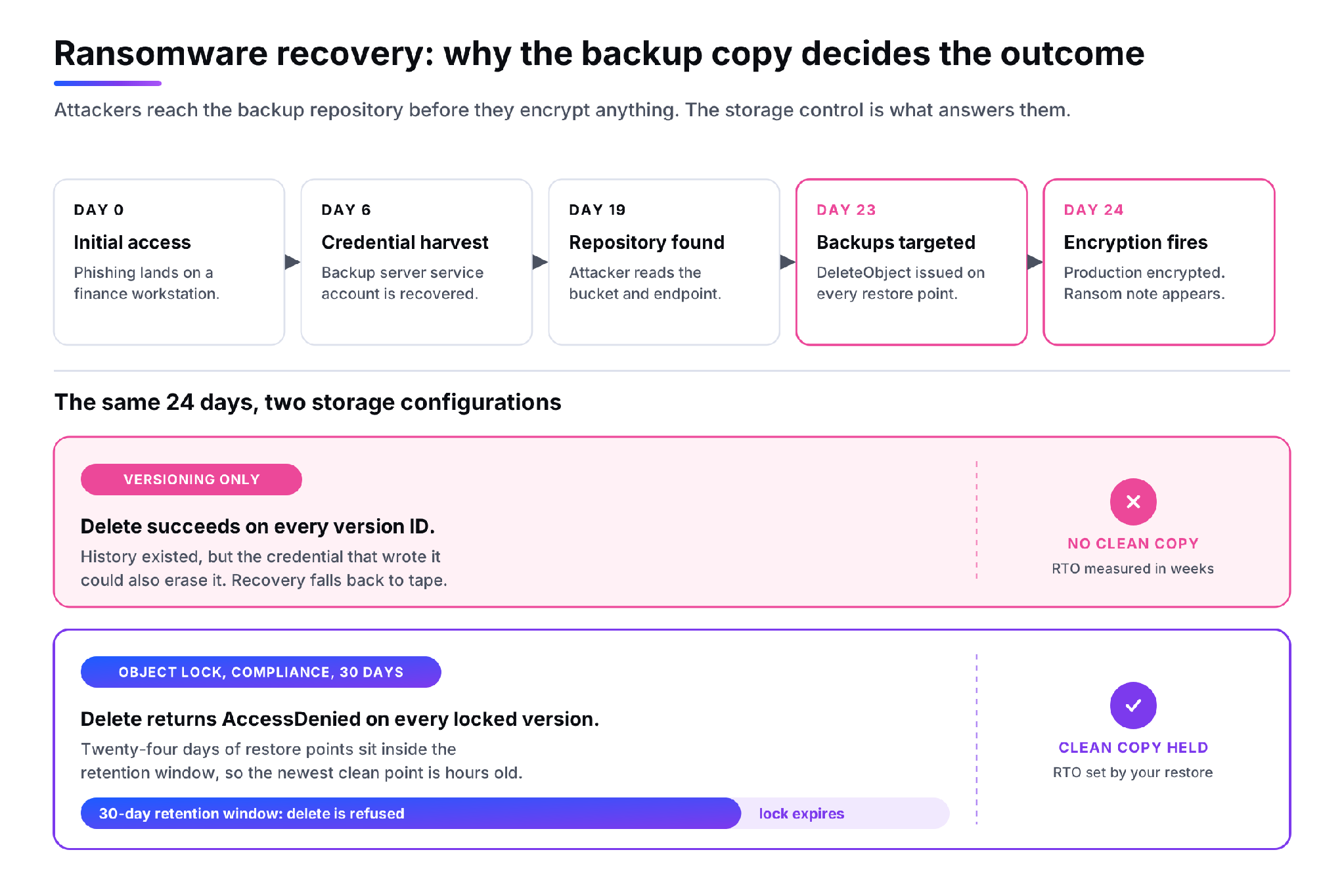 *Figure 3. Attackers reach the backup repository before they encrypt anything. The storage control is what answers them.*
---
## **Isolated Credentials Shrink The Blast Radius**
Object Lock removes the delete path. Credential isolation removes the reconnaissance path, and the two work as a pair rather than alternatives.
Start by assuming the production estate is fully compromised: hypervisors, directory services, the backup server and every admin workstation. Then split the storage identities so that no single key can both create and destroy a restore point.
The **write identity** belongs to the backup job and holds s3:PutObject, s3:PutObjectRetention and s3:ListBucket. It does not hold s3:DeleteObjectVersion and it never holds s3:BypassGovernanceRetention. If it leaks, the attacker can add data, which is harmless.
The **restore identity** is read-only, carrying s3:GetObject, s3:GetObjectVersion and s3:ListBucketVersions. It is not stored on the backup server. Keep it in a password manager or a sealed envelope, somewhere that survives the production identity provider being owned.
The **expiry identity**, the one that eventually removes versions, lives in a separate console behind MFA and is used on a schedule rather than continuously. Keep the storage account itself outside the production directory, because an identity provider compromise should not hand over the storage tenancy as well.
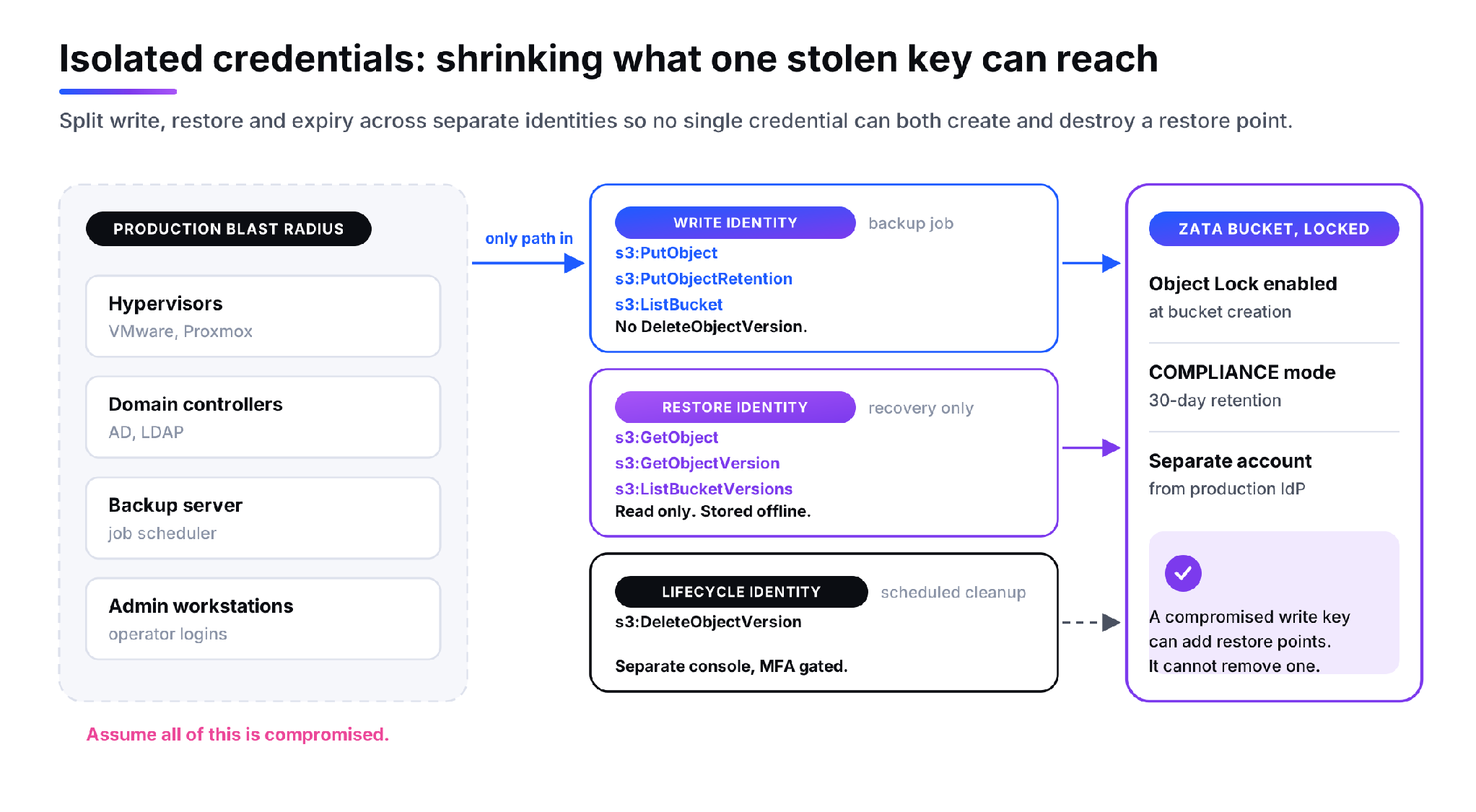 *Figure 4. Split write, restore and expiry across separate identities so no single credential can both create and destroy a restore point.*
---
## **Tested Restores Are The Control Nobody Schedules**
Immutability is a guarantee about bytes. It says nothing about whether those bytes reassemble into a running system, or how long that takes. The only instrument that measures the second thing is a restore you actually perform.
A useful test picks a restore point from inside the lock window rather than the newest one, restores into an isolated network with no route to production, and then proves the result: boot the machine, log in, run a query, compare a hash. Record the measured recovery time and recovery point, not the target from the DR policy, and write the gap into the record. Most first attempts surface something procedural rather than technical. Nobody knows where the restore credentials are. The runbook references a console that was replaced last year. The restore works but takes eleven hours against a four-hour commitment.
Quarterly is a reasonable cadence for most environments, and after any change to retention, tooling or network topology. [Veeam's immutability documentation](https://helpcenter.veeam.com/archive/vbaws/10/guide/immutability.html) is clear that an immutable repository also removes your ability to clear data manually, which is another reason to rehearse before an incident rather than during one.
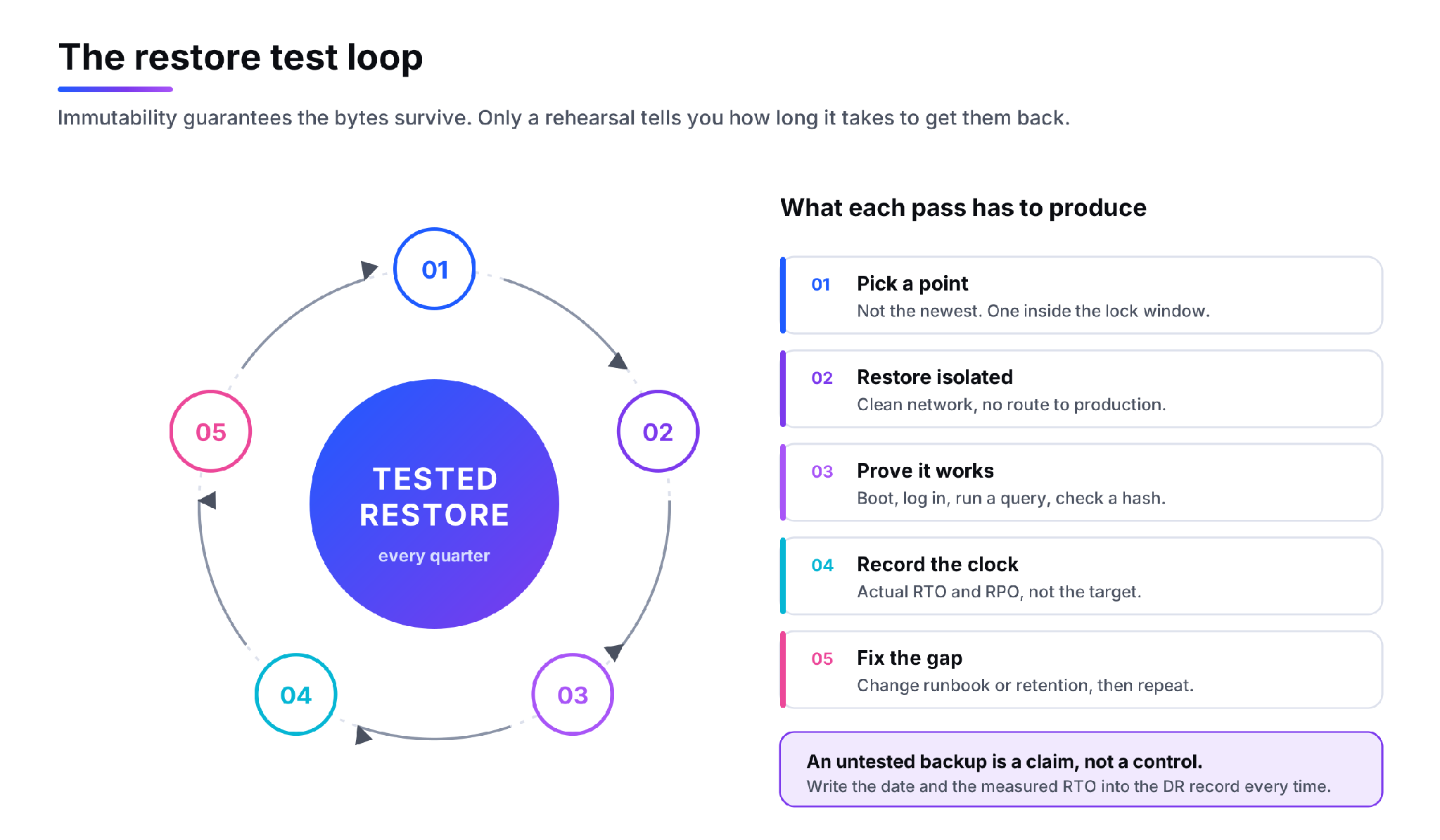 *Figure 5. Immutability guarantees the bytes survive. Only a rehearsal tells you how long it takes to get them back.*
---
## **When To Use Each**
- Use **versioning on its own** where the threat is human error and the data is cheap to replace: static assets, build artifacts, configuration repositories, development buckets. Pair it with a lifecycle rule so version count stays bounded.
- Use **versioning with governance-mode Object Lock** for internal operational backups where you want protection from mistakes but still need an administrative path to correct a bad retention setting. Treat the bypass permission as privileged and audit every use of it.
- Use **compliance-mode Object Lock** for anything that is your answer to ransomware, and for regulatory retention where an auditor will ask whether the record could have been altered. Set the window longer than your realistic detection time.
- Add a **legal hold** on top when a specific dataset is under investigation and the release date is unknown.
---
## **FAQs**
**What is the difference between immutable backups and versioning?**
Versioning preserves earlier generations of an object so you can roll back an overwrite or an accidental delete. Immutability uses S3 Object Lock to refuse deletion of a version until its retention period expires. Versioning protects against mistakes. Immutability protects against intent, including an administrator acting with valid credentials.
**Can object versioning protect against ransomware?**
Only partially. Versioning survives encryption-in-place, because the unencrypted version is still addressable. It does not survive a deliberate deletion campaign, which is what modern ransomware operators run against backup repositories before encrypting production. Without a retention lock, the same key that writes versions can enumerate and remove them.
**How does S3 Object Lock work for backups?**
Object Lock is enabled when the bucket is created, which also enables versioning permanently. The backup tool writes each restore point as a new object version and applies a retention date to it. Until that date passes, overwrite and delete requests against the version are refused by the storage service rather than by an access policy.
**Governance mode or compliance mode for backups?**
Use compliance mode for anything that is your ransomware answer. Governance mode allows an identity with the bypass permission to shorten or remove the lock, and that permission is reachable by an attacker holding administrative credentials. Governance mode is reasonable for internal buckets where retention mistakes need a correction path.
**How often should you test backup restores?**
Quarterly for most environments, plus after any change to retention policy, backup software or network design. Restore into an isolated network, verify the system boots and the data is intact, and record the measured recovery time rather than the target. The first test usually exposes a procedural gap rather than a storage one.
---
## **Put the controls in the right order**
Pick the retention window first, because under compliance mode it is not reversible. Create the bucket with Object Lock enabled, because you cannot add it later. Split the credentials before the first job runs, because retrofitting identities across a running backup estate is tedious. Then schedule the restore test, because everything above is a hypothesis until one succeeds.
> **NEXT STEP**
>
> If you are weighing immutable backups vs versioning for your own data, start with how you would answer those four decisions. Our [backup and disaster recovery](https://zata.ai/solutions/backup-and-disaster-recovery) page covers how ZATA's S3-compatible object storage fits an existing Veeam, Acronis or Commvault deployment, and the team can walk through retention sizing and credential separation against your current recovery targets.