
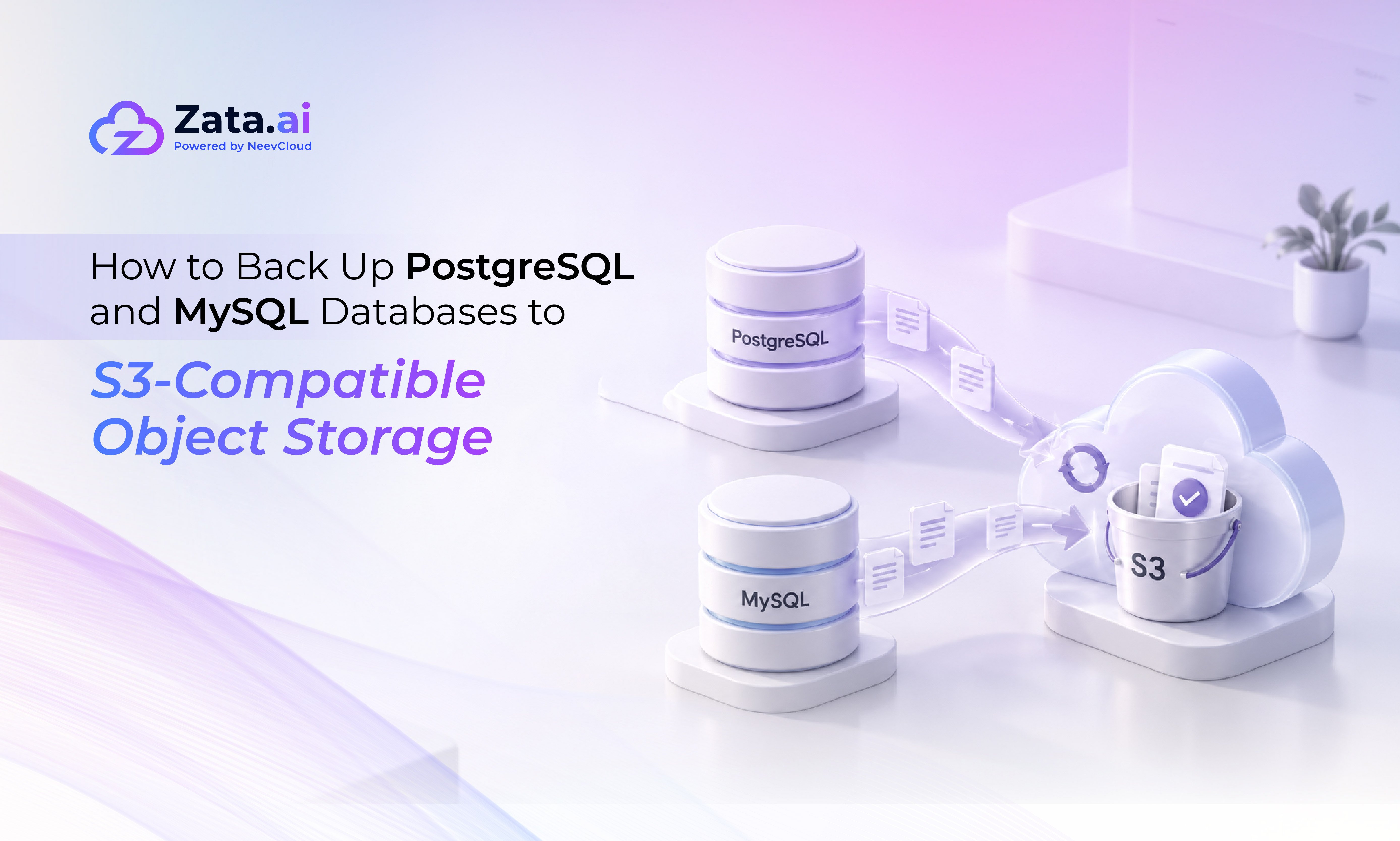
How to Back Up PostgreSQL and MySQL Databases to S3-Compatible Object Storage
TL;DR:
▪ A database backup to S3-compatible storage is really two decisions: which backup tool produces the artifact, and what the bucket does to that artifact once it lands. Most teams get the first right and ignore the second.
▪ Consistency, compression and encryption are properties of the backup tool. Immutability, versioning and expiry are properties of the bucket. Neither side covers for the other.
▪ pgBackRest and Percona XtraBackup talk to an S3 endpoint directly. pg_dump, mysqldump and mydumper do not, so they need a separate uploader such as the AWS CLI or rclone.
▪ A backup you have never restored is an untested hypothesis. Schedule the restore drill the same way you schedule the backup, and record how long it took.
Postgres and MySQL both ship perfectly good backup tooling. What neither ships is a durable place to keep the output. Writing a database backup to S3-compatible storage closes that gap, because the S3 API gives you a single upload path that works the same from a laptop, a bare metal host or a Kubernetes CronJob. The catch is that object storage will accept anything you send it, including a truncated dump, an unencrypted one, or forty copies of the same file. This guide walks the full chain: dump, schedule, encrypt, upload, retain, restore.
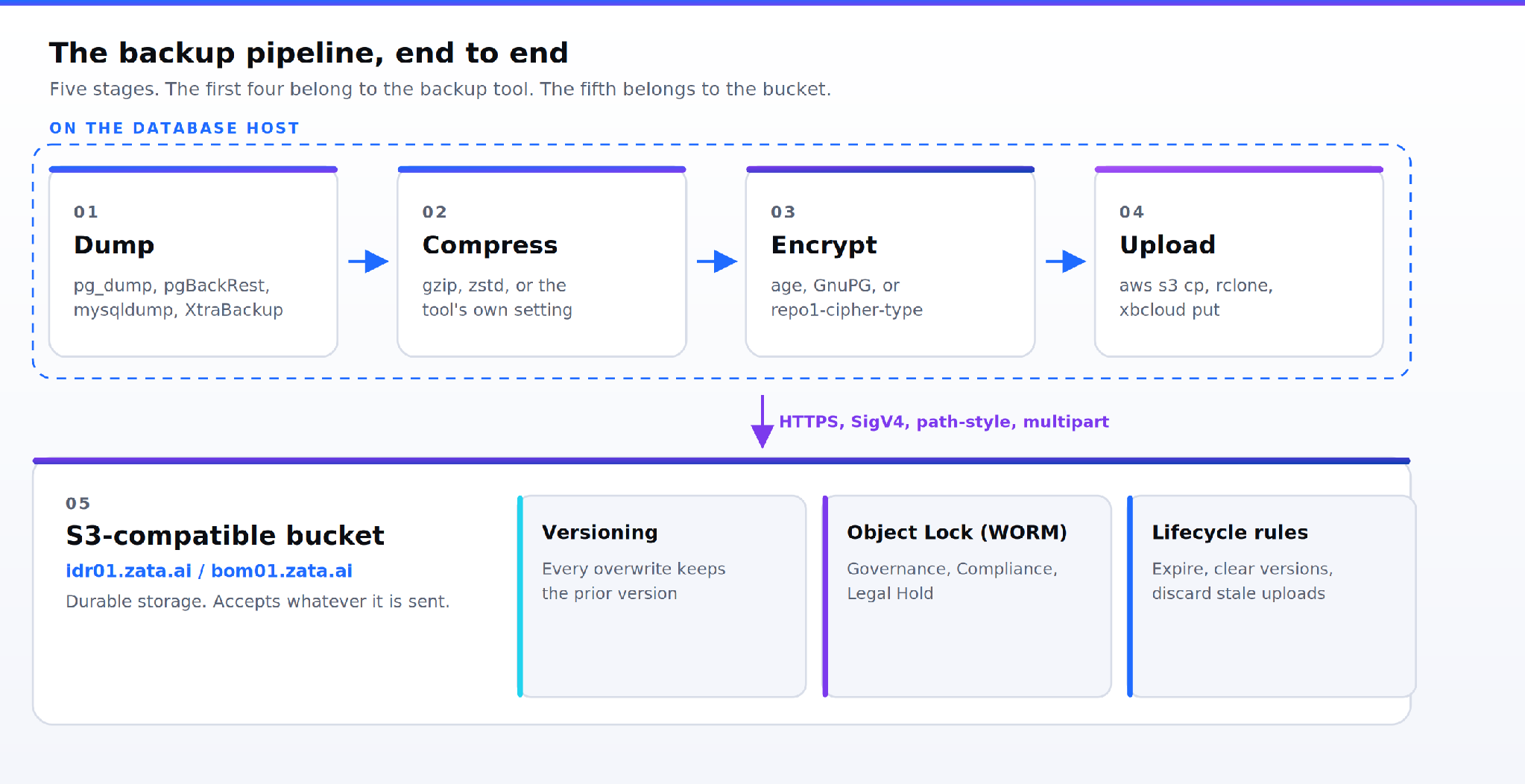
Figure 1. The five stages of a database backup to S3-compatible storage. Stages one to four are owned by the backup tool; stage five is owned by the bucket.
What a database backup to S3-compatible storage needs from the endpoint
An S3-compatible service exposes the same verbs as Amazon S3: PUT, GET, HEAD, DELETE, plus multipart upload for large objects and SigV4 request signing. Point a client at a different endpoint and the rest of your tooling does not change. On Zata the service URL is the region endpoint, https://idr01.zata.ai or https://bom01.zata.ai, used together with an Access Key ID and Secret Access Key.
Two settings break more S3-compatible integrations than anything else. Set path-style addressing, because many clients default to virtual-host style and will try to resolve bucket.idr01.zata.ai. Set signature version 4 unless a tool's own documentation says otherwise. Every example below carries both.
What the endpoint does not give you is a consistent database. Object storage stores bytes. The question of whether those bytes represent a transactionally coherent snapshot is answered entirely upstream, by the backup tool.
Logical dumps and physical backups
A logical backup is SQL or an archive of SQL: portable, slow to restore, and indifferent to the server version and storage engine. A physical backup is a byte-level copy of the data directory: fast to restore, fussy about versions, and the only sane option above a few hundred gigabytes.
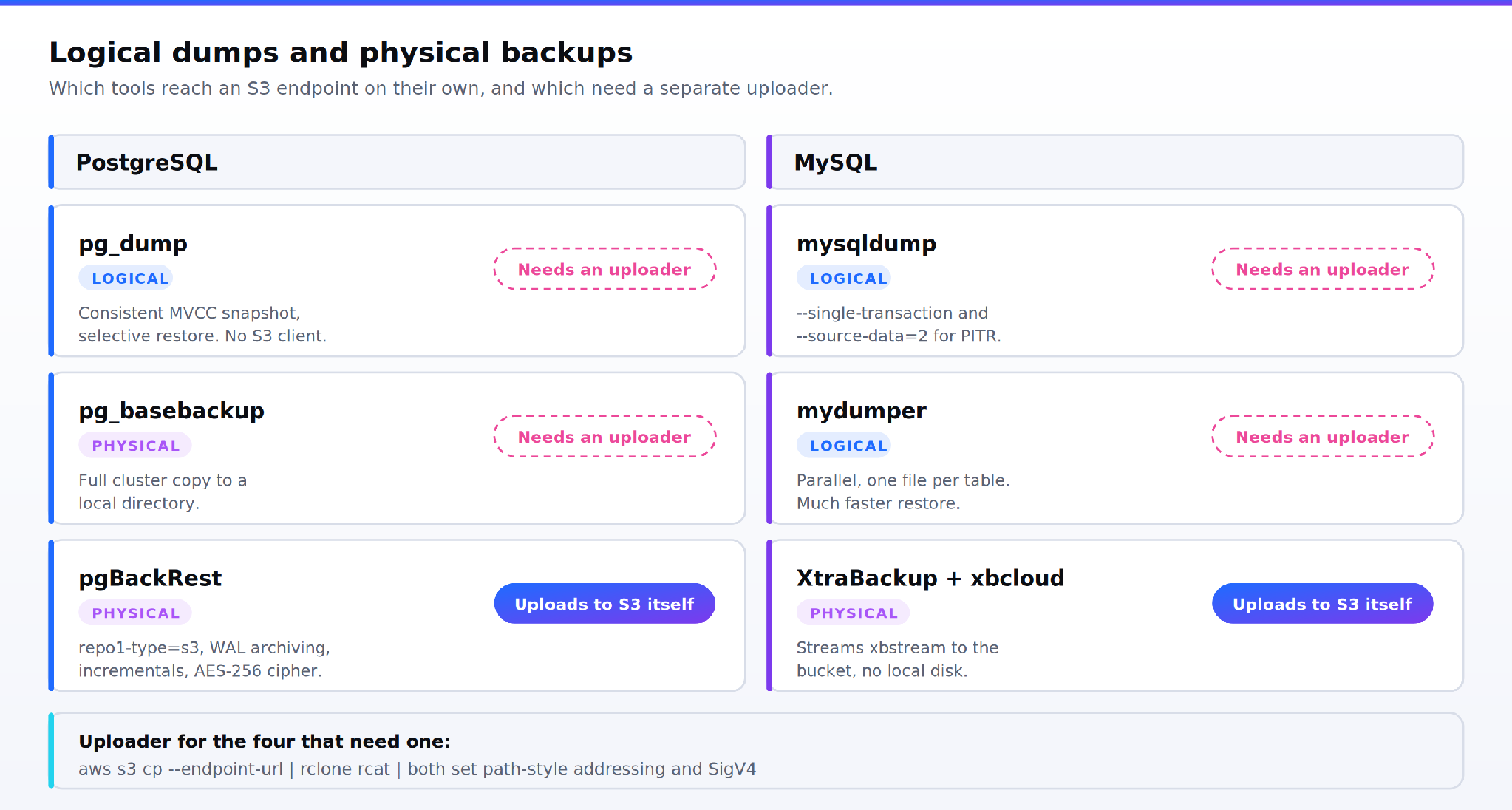
Figure 2. PostgreSQL and MySQL backup tools, split by logical versus physical and by whether they can reach an S3 endpoint without a separate uploader.
PostgreSQL
pg_dump with --format=custom writes a compressed, selectively restorable archive of one database, from a consistent MVCC snapshot. It writes to a file or stdout. It has no idea what S3 is.
pgBackRest is the other end of the spectrum. It does full, differential and incremental physical backups, archives WAL continuously for point-in-time recovery, and writes straight to an S3 repository. Configure the repository once:
[global]
repo1-type=s3
repo1-s3-endpoint=idr01.zata.ai
repo1-s3-bucket=pg-backups
repo1-s3-region=CentralIndia
repo1-s3-uri-style=path
repo1-s3-key=<access-key-id>
repo1-s3-key-secret=<secret-access-key>
repo1-path=/pgbackrest
repo1-cipher-type=aes-256-cbc
repo1-cipher-pass=<long-random-passphrase>
repo1-retention-full=4
start-fast=y
Then pgbackrest --stanza=orders backup --type=full on Sunday and --type=incr on the other six days, with archive_command = 'pgbackrest --stanza=orders archive-push %p' in postgresql.conf so WAL keeps flowing between them.
MySQL
mysqldump with --single-transaction gives a consistent dump of InnoDB tables without locking writers. Add --source-data=2 to record the binary log position as a comment, which is what makes point-in-time recovery possible later. mydumper does the same job in parallel and writes one file per table, which restores far faster.
Percona XtraBackup is the physical option, and its companion binary xbcloud speaks S3 natively. The backup streams through xbstream and goes to the bucket without ever landing on local disk:
xtrabackup --backup --stream=xbstream --target-dir=/tmp/xb \
  --extra-lsndir=/var/lib/xtrabackup/lsn \
| xbcloud put \
    --storage=s3 \
    --s3-endpoint=https://idr01.zata.ai \
    --s3-bucket=mysql-backups \
    --s3-bucket-lookup=path \
    --s3-api-version=4 \
    --parallel=8 \
    "full-$(date -u +%Y%m%dT%H%M%SZ)"
--extra-lsndir is what later incremental backups read to find their base LSN, so do not drop it.
Scheduling
Cron is still correct for a single host. Use systemd timers if you want the run captured in the journal and a sane OnFailure hook, and a Kubernetes CronJob with concurrencyPolicy: Forbid if the database lives in a cluster. Whichever you pick, three rules hold.
Name objects with a UTC timestamp in sortable form, %Y%m%dT%H%M%SZ. Local time and daylight handling have no place in a backup key. Second, make the job exit non-zero on failure and wire that to an alert, because a cron job that fails silently every night for six weeks is the single most common cause of an unrecoverable outage. Third, take a lock. Two overlapping dumps of the same database will not corrupt anything, but they will double your I/O at exactly the wrong moment.
Cadence follows your recovery point objective. Weekly full plus nightly incremental plus continuous WAL or binlog shipping gets most transactional workloads to an RPO measured in minutes.
Encrypt before the bytes leave the host
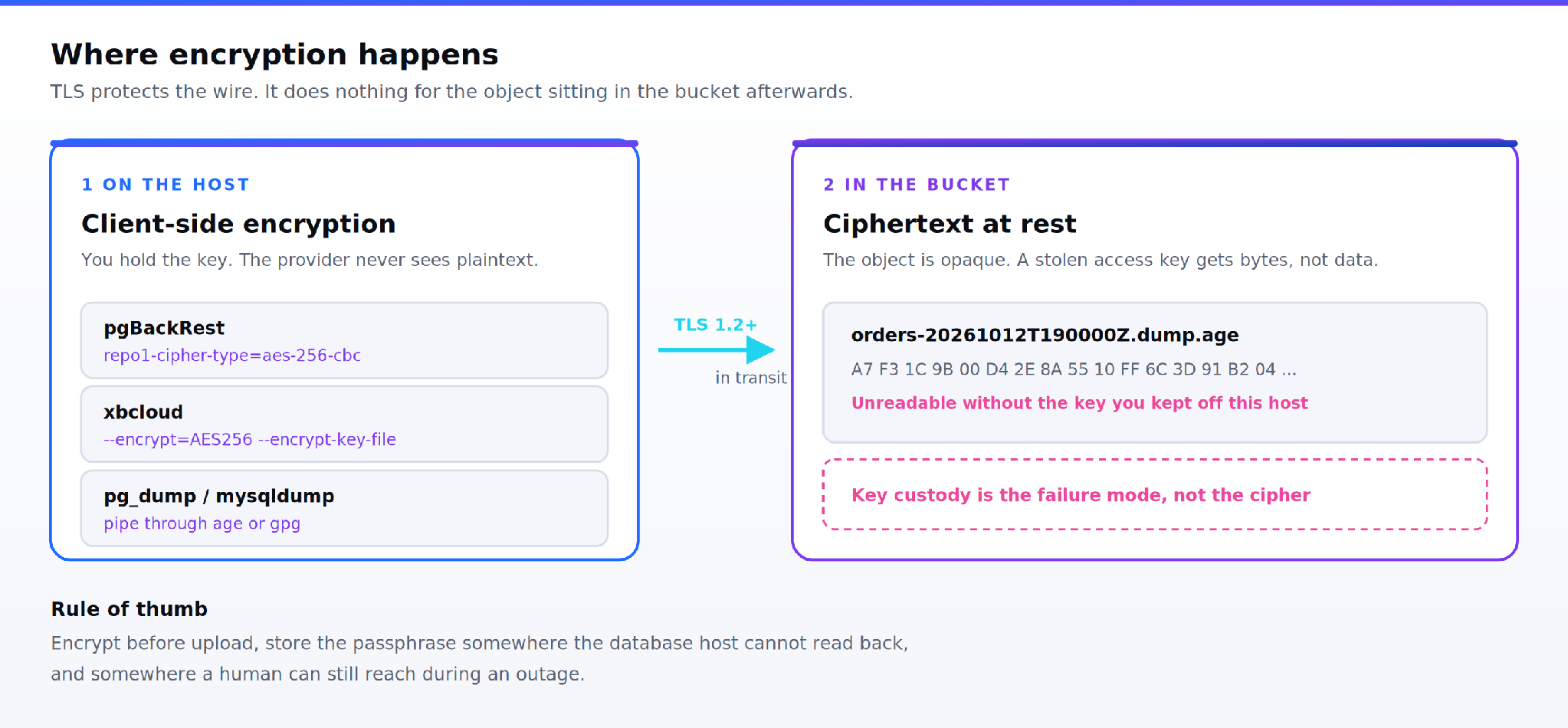
Figure 3. The encryption boundary. TLS covers the upload; only client-side encryption covers the object at rest.
TLS protects the upload. It does nothing for the object sitting in the bucket afterwards. For anything holding personal data under the DPDP Act, encrypt the artifact itself, on the database host, before upload. That keeps the key in your custody rather than the provider's.
Where this happens depends on the tool:
pgBackRest encrypts the whole repository with repo1-cipher-type=aes-256-cbc and a passphrase you supply. Lose the passphrase and the backups are unrecoverable, which is the point.
xbcloud takes --encrypt=AES256 with --encrypt-key-file.
pg_dump, mysqldump and mydumper have no encryption of their own. Pipe them through age or GnuPG.
A complete logical pipeline for MySQL, compressed, encrypted and streamed in one pass:
TS=$(date -u +%Y%m%dT%H%M%SZ)

mysqldump --single-transaction --source-data=2 \
  --routines --events --all-databases \
| zstd -3 \
| gpg --encrypt --recipient backups@example.com \
| rclone rcat "zata:mysql-backups/logical/full-$TS.sql.zst.gpg"
Store the passphrase or recipient key somewhere the database host cannot read back, and somewhere a human can get to during an outage. A key held only in the environment of the machine you are restoring is not a key you have.
Automating the upload
For tools that do not speak S3, two uploaders cover nearly everything.
The AWS CLI works against any S3-compatible endpoint once path-style addressing is set:
aws configure set default.s3.addressing_style path
export AWS_ACCESS_KEY_ID=...
export AWS_SECRET_ACCESS_KEY=...
export AWS_DEFAULT_REGION=CentralIndia

pg_dump --format=custom --compress=9 --dbname=orders \
| age --encrypt --recipients-file /etc/backup/recipients.txt \
> "/var/tmp/orders-$(date -u +%Y%m%dT%H%M%SZ).dump.age"

aws s3 cp /var/tmp/orders-*.dump.age \
  s3://pg-backups/postgres/orders/ \
  --endpoint-url https://idr01.zata.ai
rclone is the better choice when you want retries, bandwidth limits and server-side checks, and it can stream from stdin with rcat, which avoids writing the dump to local disk at all. Both split large objects into multipart uploads automatically.
Verify the upload rather than assuming it. aws s3api head-object returns the size and ETag; compare the size against what the dump reported. An interrupted multipart upload leaves parts behind that count against storage until something clears them, which is one of the lifecycle rules below.
Retention, versioning and immutability
This is the half of the problem the backup tool cannot solve. Retention inside pgBackRest expires its own repository, but it will not stop an attacker with your access key from deleting every object in the bucket. Bucket-level controls will.
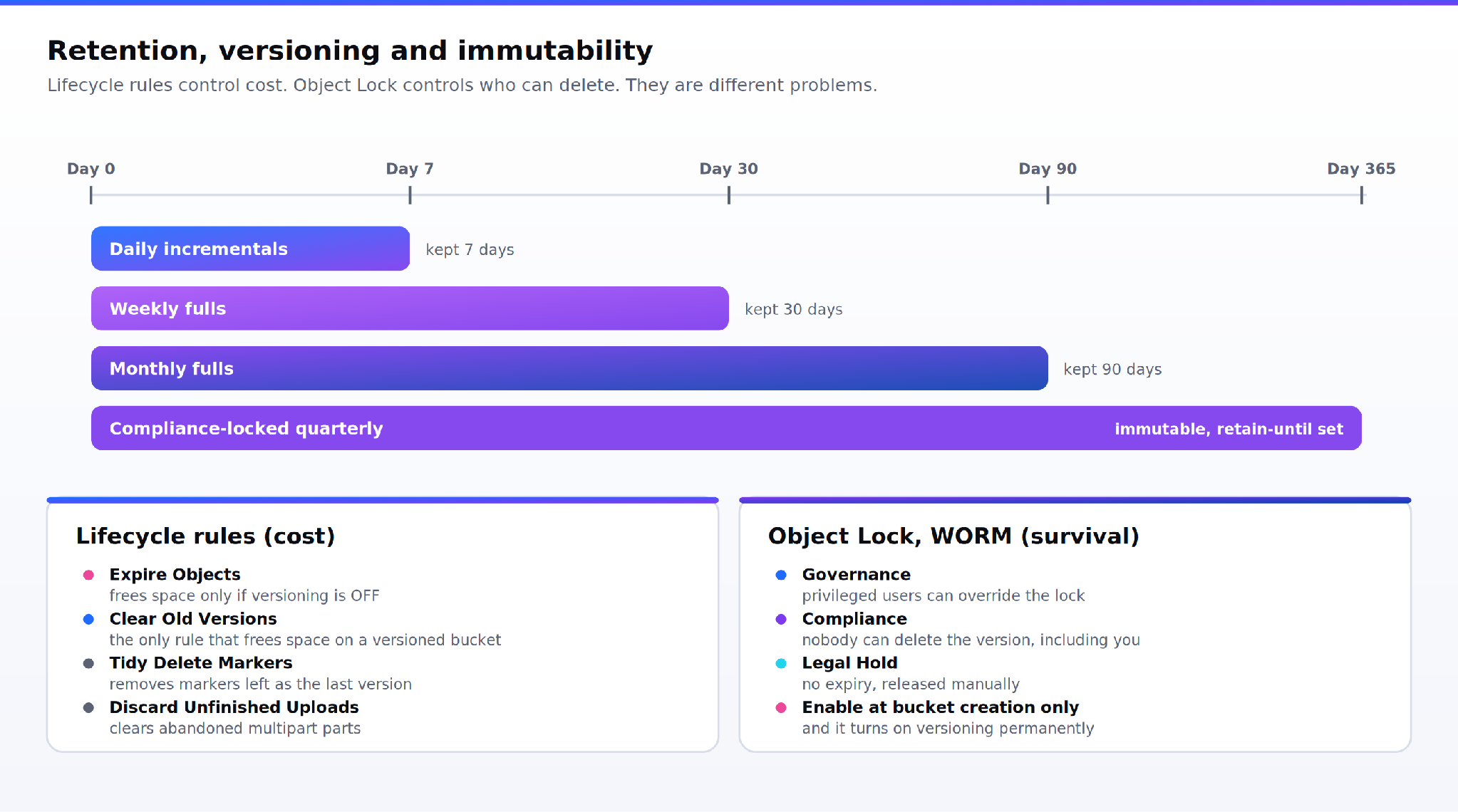
Figure 4. A grandfather-father-son retention schedule mapped onto lifecycle rules and Object Lock modes.
Lifecycle rules on Zata cover four actions, and the distinction between the first two matters more than it looks:
| Rule | What it does | When it frees space |
|---|---|---|
| Expire Objects | Hides the current version behind a delete marker after N days | Only if versioning is off |
| Clear Old Versions | Permanently deletes superseded versions after N days | Always, on versioned buckets |
| Tidy Delete Markers | Removes delete markers left as an object's only version | Housekeeping |
| Discard Unfinished Uploads | Clears parts from interrupted multipart uploads | Always |
On a versioned bucket, Expire Objects alone will never reduce your bill. You need Clear Old Versions. Rules run once daily, so a change takes 24 to 48 hours to show up.
For backups that have to survive a compromised credential, use Object Lock, which applies the Write-Once-Read-Many model. Zata offers Governance mode (privileged users can override), Compliance mode (nobody can delete the version until retention expires, including you) and Legal Hold (no expiry, released manually). Two constraints are worth knowing before you create the bucket: Object Lock can only be enabled at bucket creation, not added later, and enabling it permanently turns on versioning.
There is also a billing-shaped limit. Zata is prepaid, so the dashboard shows a recommended maximum retain-until date tied to your billing cycle, and data locked beyond a suspended account's termination is not protected by the lock. Treat a seven-year Compliance lock as a contractual question, not just a checkbox.
Restore testing
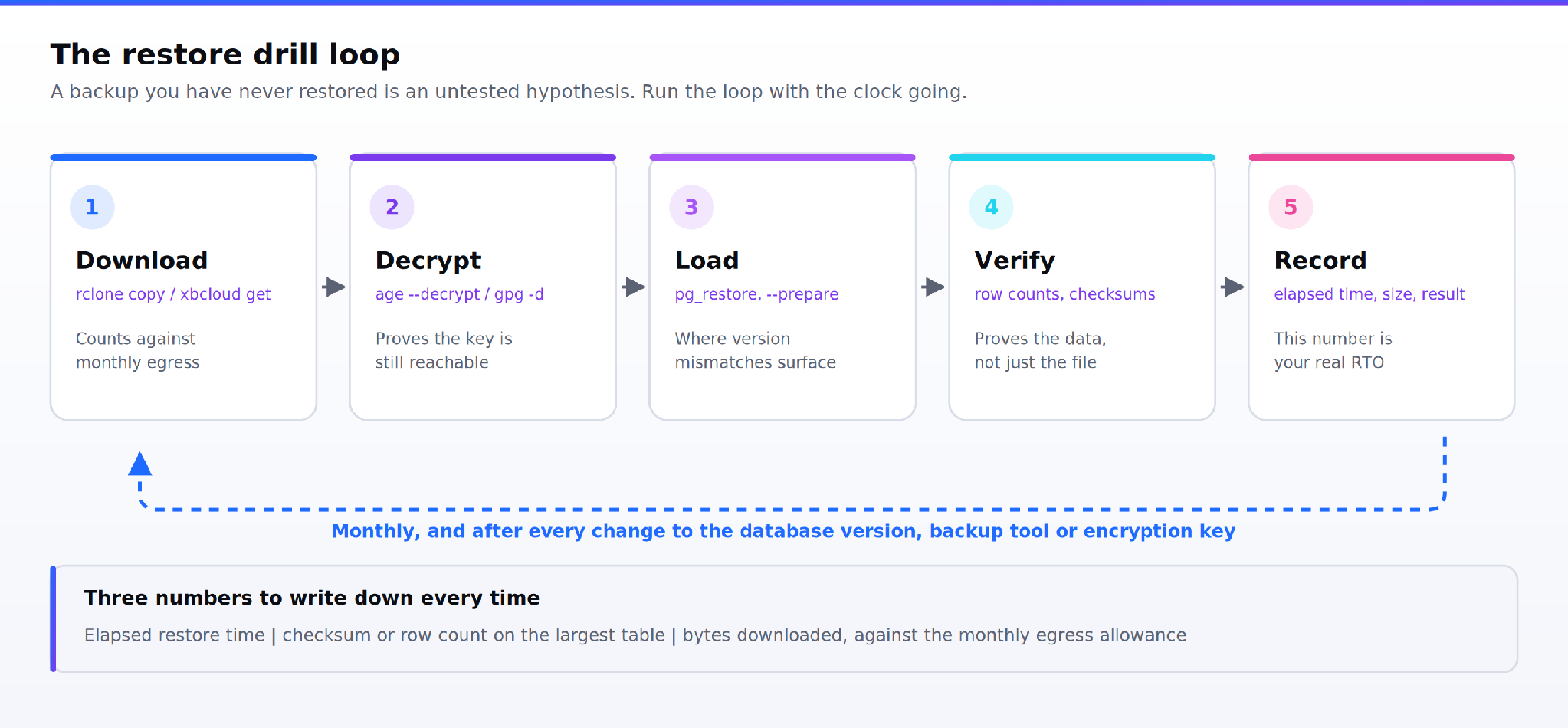
Figure 5. The restore drill loop, and the three numbers worth recording on every pass.
A restore drill answers three questions a successful backup job cannot: does the artifact decrypt, does it load, and how long does it take. Run it on a schedule, against a scratch instance, with the clock running.
rclone copy \
  zata:pg-backups/postgres/orders/orders-20261012T190000Z.dump.age \
  /restore/

age --decrypt --identity /etc/backup/key.txt \
  /restore/orders-*.dump.age > /restore/orders.dump

createdb orders_verify
pg_restore --dbname=orders_verify --jobs=8 \
  --exit-on-error /restore/orders.dump
For XtraBackup the sequence is xbcloud get into xbstream -x, then xtrabackup --prepare, then --copy-back. The --prepare step is where a backup taken without --extra-lsndir or with a mismatched server version fails, and that is exactly why you want to find out on a Tuesday afternoon rather than during an incident.
Three things to record each time: elapsed restore time, a row count or checksum on your largest table, and the size of the download. That last one matters because egress is metered. On Zata, uploads are free and unlimited, and egress is free up to your active storage volume per month, so a full monthly restore drill of a 2 TB backup set sits comfortably inside a 2 TB plan. Size the drill against that allowance rather than discovering it mid-restore.
Which step belongs to which layer
| Step | Backup tool decides | Object storage decides | Verify by |
|---|---|---|---|
| Transactional consistency | Yes | No | Restoring and running a checksum query |
| Compression and parallelism | Yes | No | Dump duration and artifact size |
| Encryption at rest | Yes, client-side | Provider-dependent | Attempting to read the object without the key |
| Multipart chunking | Yes, via the uploader | API limits only | head-object size against the dump size |
| Immutability | No | Yes, Object Lock | Trying to delete a locked version |
| Expiring old copies | Partly, its own repo | Yes, lifecycle rules | Bucket size trending flat, not up |
| Restore throughput | Yes, --jobs, --parallel | Partly, egress and link speed | Timing the drill |
Where this leaves you
The gap between a team that has backups and a team that can recover is almost never the dump command. It is the four things around it: a schedule that alerts on failure, a key you can still read during an outage, a bucket that will not let a compromised credential erase its own history, and a restore you have timed recently enough to quote a number.
Zata is S3-compatible object storage with Indian regions, Object Lock, lifecycle rules and free ingress, which makes it a straightforward target for every database backup to S3-compatible storage pipeline above. Point your existing tool at idr01.zata.ai or bom01.zata.ai and the configuration is a bucket name, a key pair and a path-style flag.
Next step: read how backup and disaster recovery on Zata is set up, then follow the integration guides for your backup tool and run one restore drill before you trust the schedule.
FAQs
How do I back up a PostgreSQL database to S3-compatible object storage?
There are two routes to a working database backup to S3-compatible storage. Either run pgBackRest with an S3 repository, which uploads physical backups and WAL directly, or run pg_dump --format=custom, encrypt the output, and push it with the AWS CLI or rclone pointed at your region endpoint. pgBackRest suits databases above a few hundred gigabytes; pg_dump suits smaller or per-database backups.
Can mysqldump upload a backup directly to S3-compatible storage?
No. mysqldump writes to a file or stdout and has no S3 client. Pipe its output through compression and encryption into rclone rcat, or write the file and copy it with aws s3 cp --endpoint-url. If you want native S3 upload from MySQL, use Percona XtraBackup with xbcloud.
Does S3-compatible object storage support immutable database backups?
Yes, through S3 Object Lock. Zata supports Governance mode, Compliance mode and Legal Hold on buckets created with Object Lock enabled. Compliance mode prevents deletion by anyone until retention expires, which is what protects backups from a stolen access key. Object Lock cannot be added to an existing bucket.
How often should I test restoring a database backup from object storage?
Monthly for a full restore drill, and on every change to the database version, backup tool or encryption key. Most restore failures come from version mismatches and missing keys, not corrupt data, and both are introduced by changes rather than by time passing.
What does it cost to pull a database backup back out of S3-compatible storage?
On Zata, uploads are free and unlimited, and each account gets free egress equal to its active storage volume per month. Exceeding it suspends the account until the plan is upgraded or the next cycle begins. Budget restore drills against that monthly allowance.