
S3 Object Storage Lifecycle Policies: A Practical Guide to Data Retention and Deletion
TL;DR
A lifecycle rule is three things: a scope, an age condition, and an action. Everything after that is detail.
On a versioned bucket, expiring an object frees no space at all. It writes a delete marker and hides the current version. Only a non-current version rule reclaims capacity.
Retention and deletion are separate controls. Object Lock decides what cannot be removed, lifecycle rules decide what gets removed and when, and the lock always wins.
Keeping files for seven years is a billing outcome. Archiving is a policy: how long, what happens next, and who is allowed to change the answer.
Most buckets holding old data were never designed to hold old data. They filled up, nobody deleted anything, and the monthly invoice became the retention policy by default. S3 object storage lifecycle policies replace that accident with a rule you can write down, scope to a prefix, and point an auditor at.
This guide covers what a lifecycle rule evaluates, how the four rule actions differ, where versioning changes the outcome, and how retention locks interact with deletion. The examples use Zata's S3-compatible object storage, though the mechanics carry across any S3-compatible backend.
Storing data for years is not archiving
A bucket holding four years of nightly backups is storage. It becomes an archive when three questions have written answers: how long each class of object has to survive, what happens the day after that, and who is allowed to shorten the answer.
Without those answers, deletion becomes a ticket somebody files when the invoice gets noticed. That fails in two directions. Either nobody files it and the bucket grows a long tail of data carrying cost and legal exposure in equal measure, or somebody files it and a manual delete runs against the wrong prefix at eleven at night.
Lifecycle policy moves the decision from the day of deletion to the day of design.
The cost argument is secondary but real. Uploads to Zata are free and unlimited, and each account gets free egress equal to its active storage volume per month. An archive you never read bills as storage and nothing else. The moment you pull data back for a restore test, that traffic counts against the monthly allowance, which is one more reason to know precisely how much of the bucket is data you still need.
What a lifecycle rule actually evaluates
A rule has three parts: a scope, an age condition, and an action. Scope is either the whole bucket or a filtered subset, usually a prefix such as logs/2024/. The condition is an age in days, counted from when that version was written. The action is what happens when the two line up.
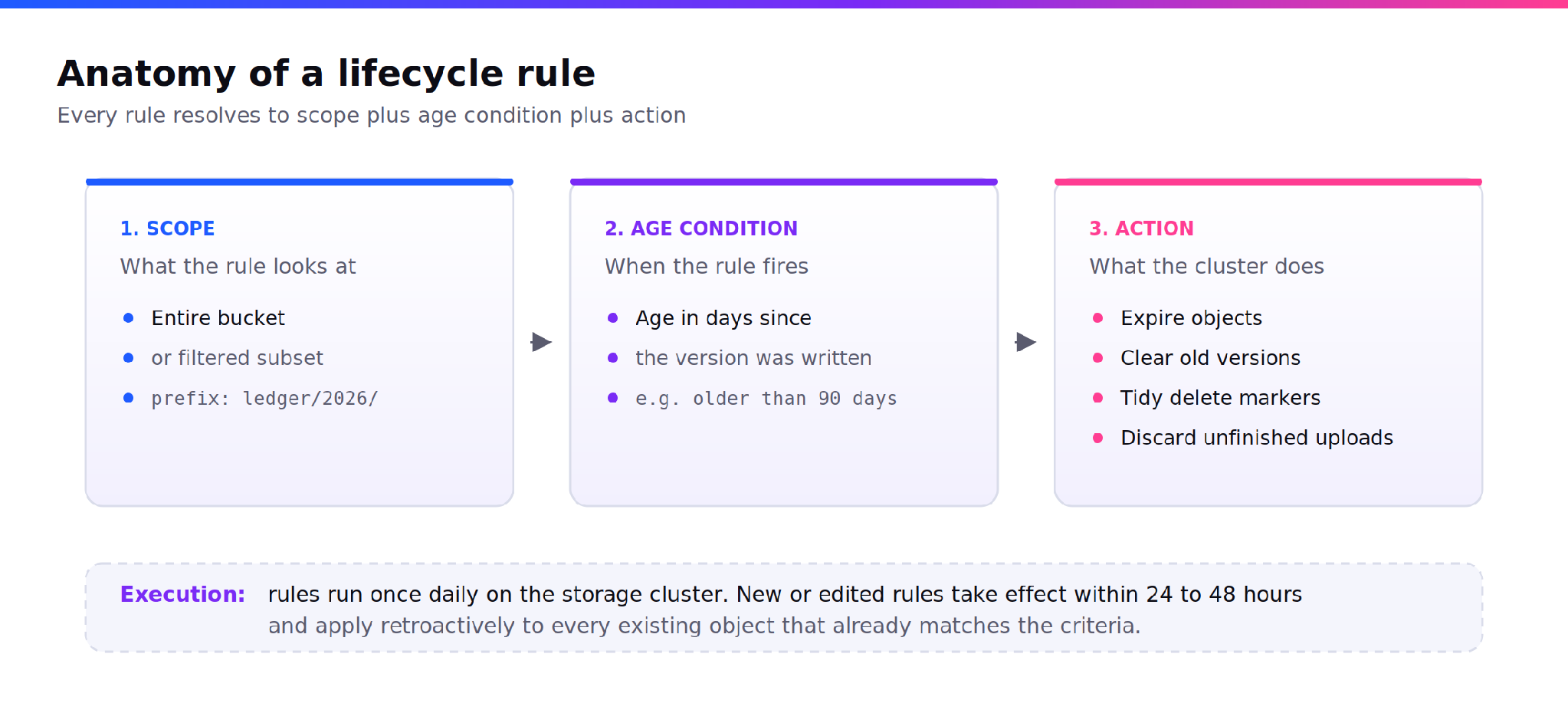
Figure 1. Every lifecycle rule resolves to a scope, an age condition and an action.
What a rule does not carry is a minute-level execution guarantee. Zata runs lifecycle rules once daily on the storage cluster, and new or edited rules take effect within 24 to 48 hours. So “expire after 30 days” means the object goes on the first daily pass after it turns 30, not at midnight on day 30. For an archive, that imprecision is irrelevant. For anything with a contractual deletion deadline, build in the buffer.
The retroactive behaviour matters more than people expect. Once a rule is live it applies to every existing object that already matches the criteria, not only to objects uploaded after it. Write a 30 day expiry rule on a bucket full of two year old files and the next pass acts on all of them.
Test new rules on a narrow prefix first.
The four actions, and which ones free space
Zata exposes four lifecycle actions. They are not variations on deletion. Each one targets a different kind of object state, and two of them exist only because versioning exists.
Expire objects
This retires the current version of an object once it reaches the age you set. On a bucket with versioning off, that is a permanent delete and the space comes back. On a versioned bucket it is not a delete at all: a delete marker is written, the object vanishes from the default listing, and every byte of the previous version stays on disk and on the invoice.
That single difference explains most “I set up lifecycle rules and my usage never dropped” support tickets in S3-compatible storage.
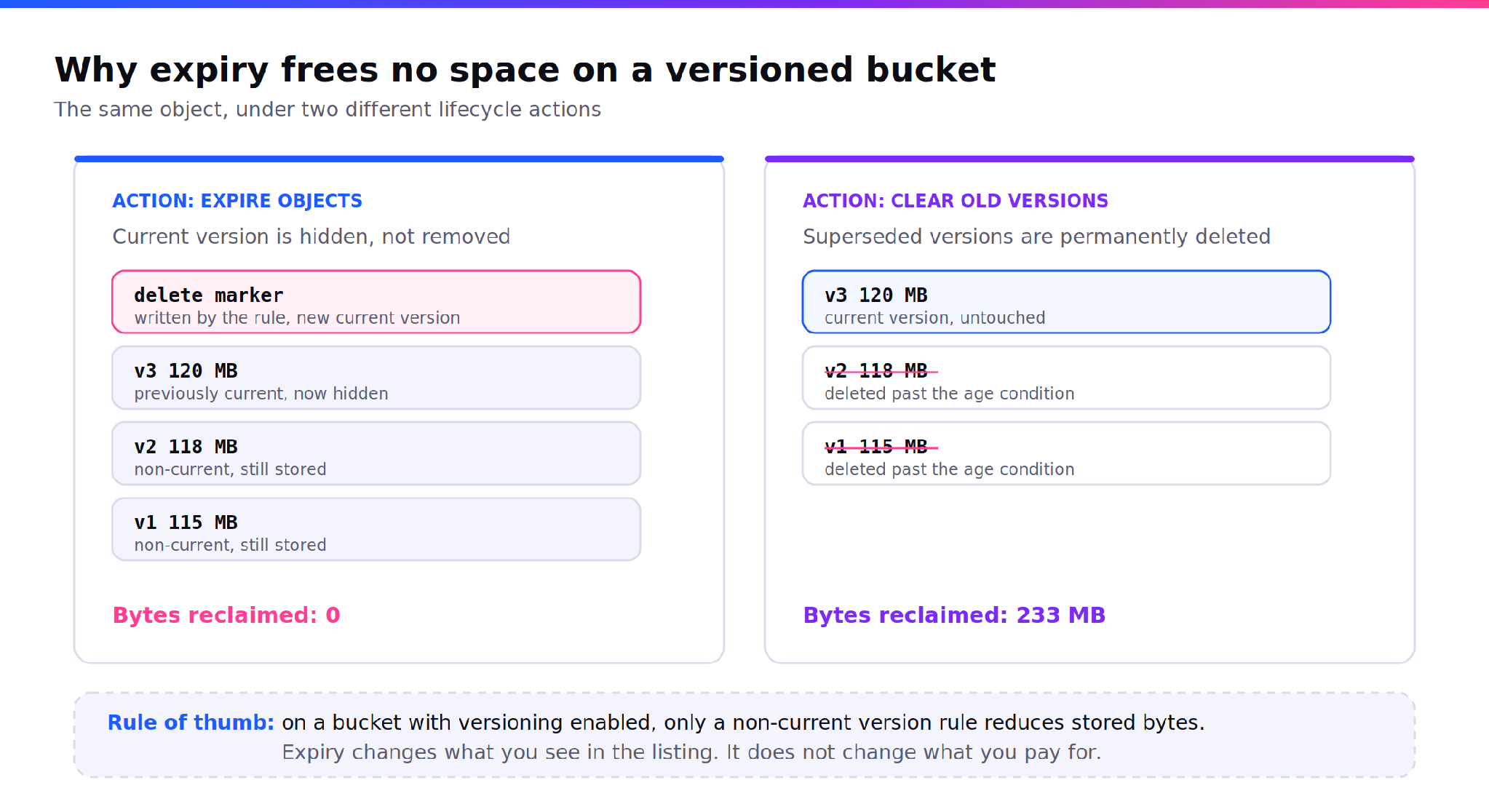
Figure 2. The same object under two actions. Only one of them reduces stored bytes.
Clear old versions
Available only when versioning is enabled, and the only action that reclaims space on a versioned bucket. It permanently deletes superseded versions once they pass the age you set.
It also accepts a floor. Set the rule to clear versions older than 10 days while keeping the newest 3, and those three survive regardless of age, so a bucket that was written to heavily last Tuesday still has a rollback path. That floor is supported in the bom01 region and not in idr01, so confirm the region before you commit it to a policy document.
Tidy delete markers
A versioned bucket slowly collects objects whose only remaining version is a delete marker. The data is gone, the tombstone is not. This rule removes those markers so the object leaves the bucket entirely. Zata will not accept it in the same rule as Expire Objects, so it needs a rule of its own.
Discard unfinished uploads
Multipart uploads that break partway leave their parts behind. The parts do not appear in the object listing, a normal delete will not reach them, and they occupy storage. A rule that discards unfinished uploads after 7 days clears them out. On any bucket receiving large backup files over an unreliable link, this is the rule with the best ratio of effort to recovered capacity.
| Action | What it targets | Frees space | Needs versioning |
|---|---|---|---|
| Expire objects | Current version past an age | Only if versioning is off | No |
| Clear old versions | Superseded versions past an age | Yes | Yes |
| Tidy delete markers | Objects left with only a delete marker | Marker only | Yes |
| Discard unfinished uploads | Parts from interrupted multipart uploads | Yes | No |
Version expiration in practice
Versioning is the setting that makes deletion recoverable and lifecycle policy necessary. Once enabled it cannot be fully removed. It can only be suspended so no new versions are created, and everything already stored stays stored.
For an archive that is the right trade, provided you pair it with expiry. The working pattern is a set of rules, not one:
| Rule | Scope | Age | Why it is there |
|---|---|---|---|
| Discard unfinished uploads | Entire bucket | 7 days | Reclaims parts from failed backup jobs |
| Expire objects | staging/ | 30 days | Retires working copies, keeps a recovery window |
| Clear old versions | Entire bucket | 90 days, keep newest 3 | The rule that actually reduces stored bytes |
| Tidy delete markers | Entire bucket | 120 days | Removes tombstones the first two rules leave behind |
Read together, this set does something no single rule can. It keeps a short recovery window for recent mistakes, caps how long superseded data lingers, and clears the residue that the first two actions never touch.
Retention: the control that overrides deletion
Lifecycle rules decide what gets deleted. Object Lock decides what cannot be. Treating these as one system is the most common design error in a data retention policy, because the two answer to different owners: lifecycle to the infrastructure team, retention to legal.
Object Lock on Zata follows the write-once-read-many model and can only be enabled when the bucket is created. It cannot be added to an existing bucket, and enabling it permanently switches versioning on. Three modes:
Governance mode. A protected version cannot be deleted, overwritten or have its lock settings changed, unless the user holds the specific permission to bypass. This is the mode for internal policy you may legitimately need to revise.
Compliance mode. Nobody deletes or overwrites the version until retention expires. Not the root user, not Zata support. The period can be extended and never shortened.
Legal hold. The same protection with no expiry date. It stays until somebody explicitly releases it.
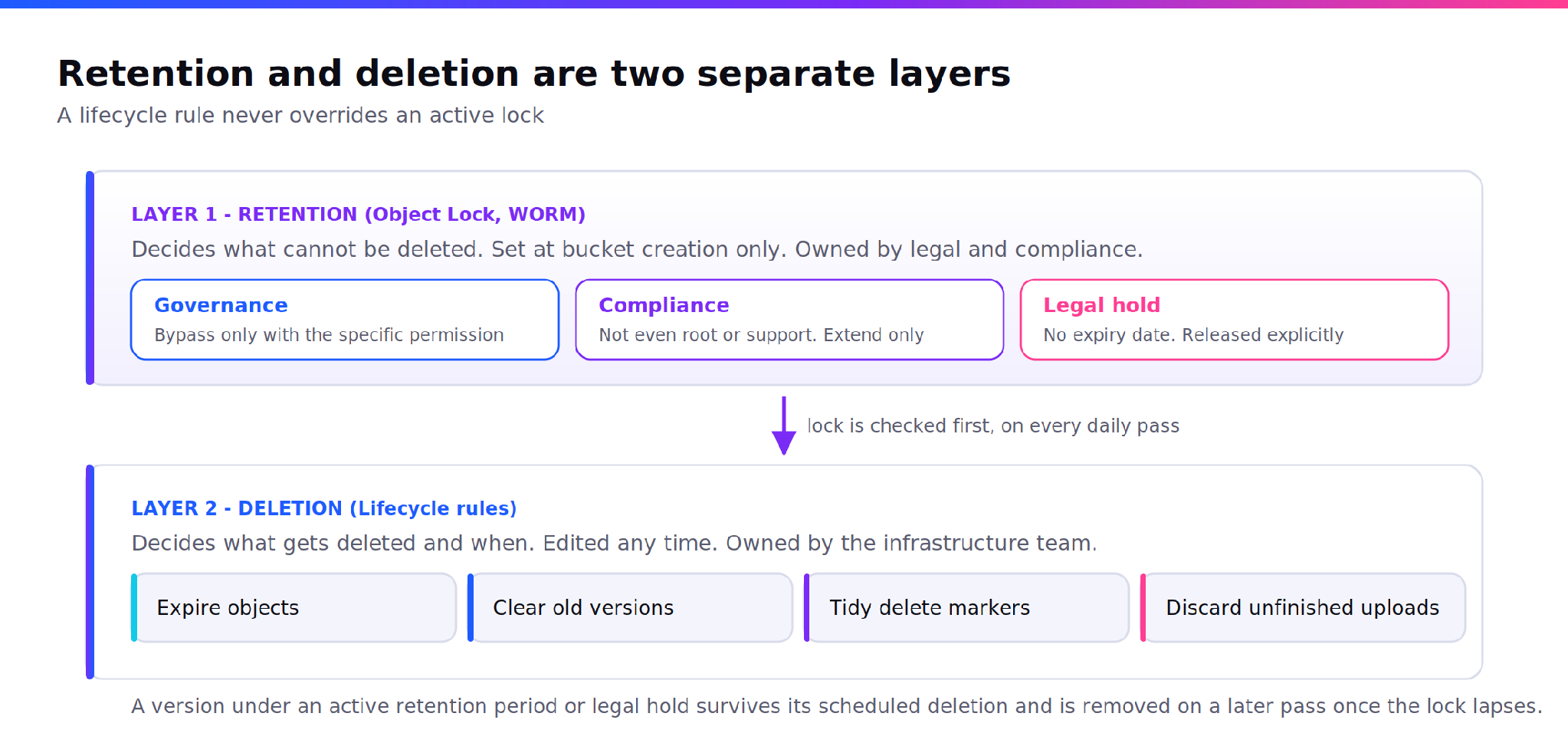
Figure 3. Retention and deletion are separate layers with separate owners.
A lifecycle rule never overrides a lock. Where a retention period or a legal hold is active, the version survives its scheduled deletion and is removed on a later pass once the lock lapses. Lifecycle is the cleaner, retention is the brake.
THE COMMERCIAL DETAIL THAT BELONGS IN EVERY LONG RETENTION PLAN
Zata is prepaid, so the dashboard shows a recommended maximum retain-until date tied to the billing cycle: roughly 45 days from account creation for trials, roughly 120 days from the start of the current cycle for billed accounts. Longer dates can be set and the lock will hold, but a lock does not protect data if the account is suspended and terminated for non-payment. A seven year retention requirement is a commercial arrangement as much as a bucket setting.
A worked archival workflow
Take a bucket for financial records that must survive one year untouched, created with Object Lock enabled and a default Compliance retention of 365 days.
Day 0, the nightly job writes ledger/2026-10-13.parquet. The default rule applies a Compliance lock the moment the object lands, so no further action is needed per object.
Day 7, a rule discards parts from an upload that failed on the second of the month. Those parts were never locked, because they were never a completed object version.
Day 90, the clear old versions rule runs. It finds superseded versions under ledger/, checks each one, and skips every version still inside its retention window. Nothing under the lock moves.
Day 365, the first locks begin to lapse. Day 366 onward, the next daily pass removes versions whose retention has expired and which now match the age condition.
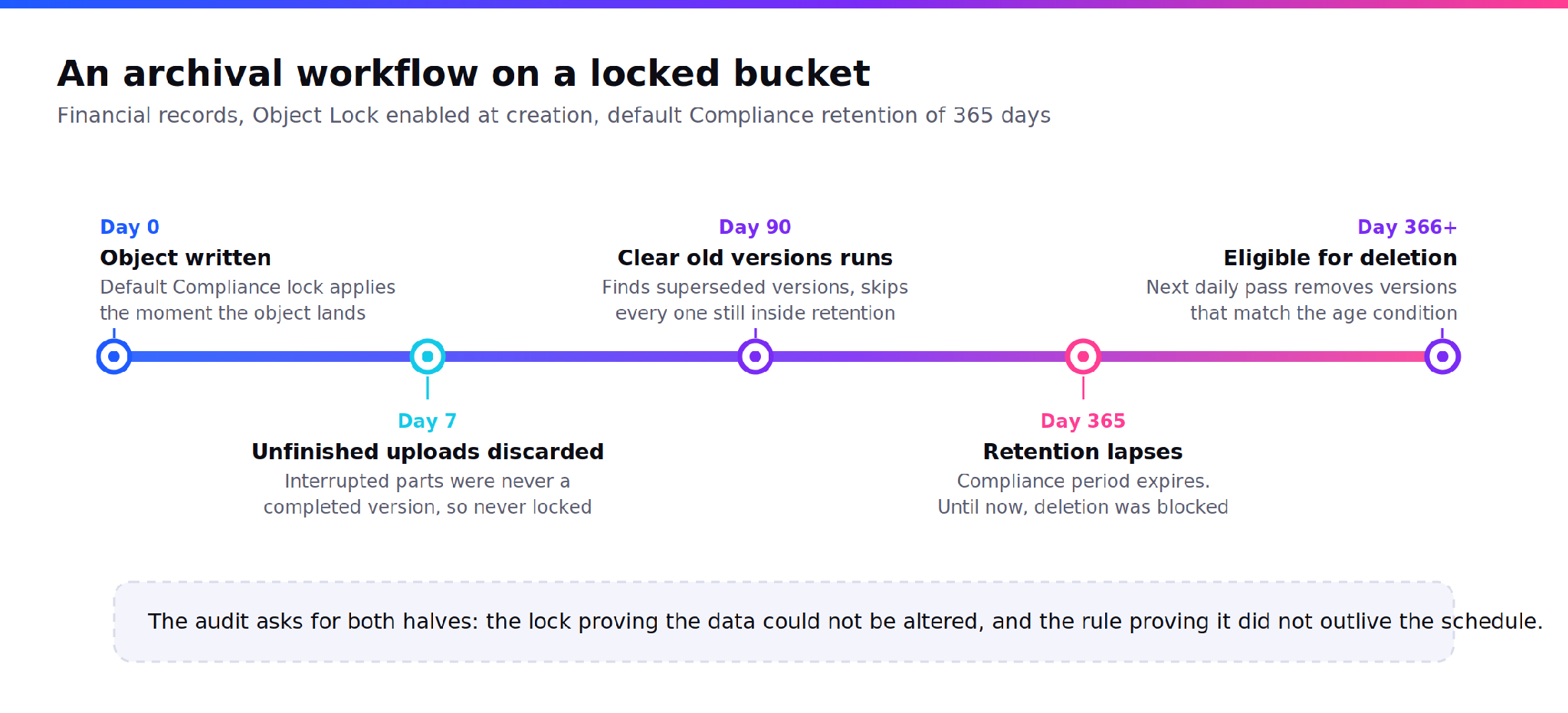
Figure 4. One object through a locked archival bucket, from write to eligible deletion.
The policy document that accompanies this describes two things: the lock that proves the data could not be altered, and the rule that proves it did not survive longer than the retention schedule allows. Auditors ask for both.
What S3 object storage lifecycle policies cannot do here
Zata runs a single storage tier at a flat rate per TB, so there is no transition action and no colder tier to move objects into. Lifecycle here means expiry and hygiene, not tiering. That removes a lever, and it also removes retrieval fees, minimum storage duration charges and early deletion penalties from the model, which is usually the better trade for an archive that gets read occasionally.
Four further checks are worth writing into the policy itself:
| Criterion | Why it matters | What to verify |
|---|---|---|
| Versioning state at rule creation | Two of the four actions do not exist without it, and expiry behaves differently | Check the bucket settings page before writing the rule, not after |
| Region for keep-newest-versions | The version floor is available in bom01 and not in idr01 | Confirm the bucket region, then confirm the option appears in the rule form |
| Object Lock at bucket creation | It cannot be added later, so the decision is permanent at day zero | Create a locked bucket for regulated data even if retention is set later |
| Rule propagation window | Rules apply retroactively to all matching existing objects within 24 to 48 hours | Apply to a test prefix, wait two days, confirm the object count moved |
For buckets where the retention schedule is measured in years rather than days, read the configuration and the compliance posture together before anything is written. Long-term data archiving on Zata (zata.ai/solutions/long-term-data-archiving) covers how the lock, the region and the billing commitment fit around the rule set described above.
Where this leaves the bucket
The difference between a storage bill and an archive is one artifact: a written rule set somebody can read without logging in. That is all S3 object storage lifecycle policies are, written down. Four actions, a prefix each, an age each, and a retention mode that says which of those rules is allowed to run. Decide those once and the cluster handles the rest on a daily schedule you never have to think about again.
START WITH ONE BUCKET
Choose a bucket and review its versioning settings, the number of non-current object versions it retains, and whether any objects are protected by retention policies or legal holds. This simple audit can reveal how much storage is being used by data you may no longer need, and where there may be opportunities to optimise costs.
FAQs
How do S3 lifecycle rules work when versioning is enabled?
Differently from what most people expect. An expiry rule writes a delete marker over the current version rather than deleting data, so stored bytes do not drop. To reclaim space you need a rule that targets non-current versions. Delete marker cleanup is a third, separate rule and cannot share a rule with expiry.
What is the difference between object lifecycle management and long-term data archiving?
Lifecycle management is the automation: scheduled rules that expire objects, clear versions and discard failed uploads. Archiving is the policy those rules carry out, including the retention period, the lock mode that enforces it and the evidence trail. Rules without a policy are just a cron job pointed at your data.
How long does a lifecycle rule take to apply to existing objects?
On Zata, rules run once daily on the storage cluster and changes take effect within 24 to 48 hours. They apply to every existing object already matching the criteria, not just new uploads. Apply a new rule to a narrow prefix and wait two days before widening the scope.
Can a lifecycle rule delete an object protected by Object Lock?
No. A version under an active retention period or legal hold survives the scheduled deletion. In Compliance mode this holds for everyone, including the root user and provider support, and the period can only be extended. Once the lock lapses, the next daily pass removes the version if it still matches the rule.
How do I delete old versions in an S3-compatible bucket without losing current files?
Use a non-current version rule rather than an expiry rule. It permanently deletes superseded versions past the age you set and never touches the current one. Where the option is supported, add a floor that keeps the newest few versions so a recent bad write is still recoverable.