How to Archive DICOM Medical Images Without Losing Access to Historical Scans
TL;DR
- Hospitals rarely lose historical scans because a disk failed. They lose them because the index that maps an accession number to a stored object was never treated as part of the archive.
- Archive DICOM instances byte for byte. Re-encoding pixel data to save capacity breaks the identity of the object and turns every future retrieval into a reconstruction exercise.
- On most S3-compatible platforms, including ZATA, Object Lock can only be enabled when the bucket is created. Retention mode is a decision you make before the first study lands, not after.
- Storage enforces retention, versioning and access scope. It does not decide which clinician may open which patient’s study. That authorisation stays in the PACS or VNA, and no storage product makes a hospital compliant by itself.
A PACS fills up faster than anyone plans for. A single CT study runs to several hundred megabytes, a 3D surgery case can pass a gigabyte, and none of it can be deleted on the schedule that ordinary business data follows. The usual answer is to move older studies to medical imaging archive storage built on object storage, which is cheaper per terabyte and scales without a forklift upgrade. The part that gets underestimated is everything around the bytes: the identifiers, the index, the retention rules and the retrieval path. Get those wrong and the studies are still there, technically, and still unreachable in practice.
This post covers what actually gets archived, where object storage belongs in a PACS workflow, how to design keys and keep the index, what retention controls the storage layer can and cannot enforce, and what to verify before the first study moves.
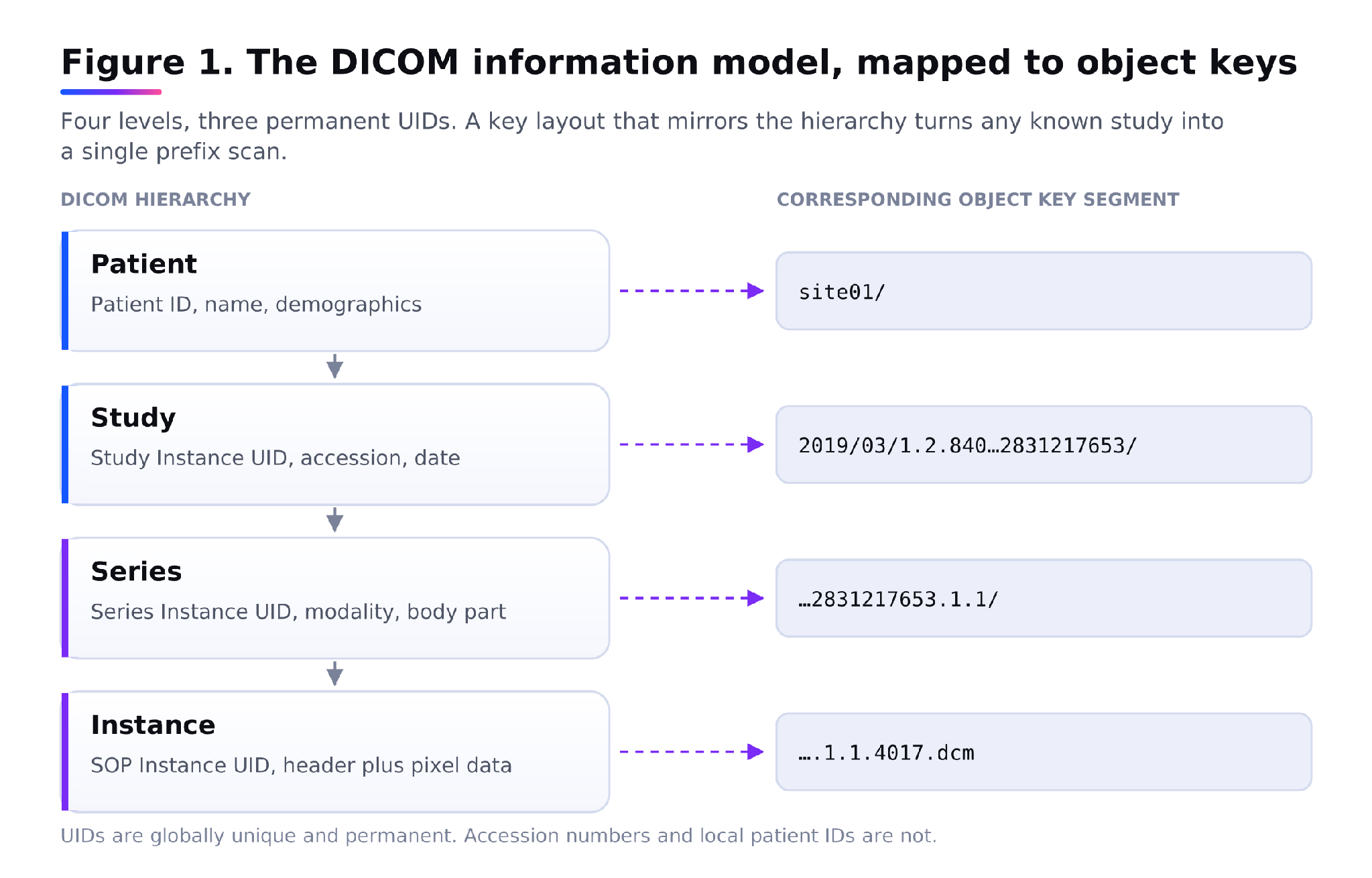
Figure 1. The DICOM information model, mapped to object keys.
What you are archiving: DICOM objects, not image files
A DICOM instance is not a picture with a label stuck on it. It is a self-describing object defined by DICOM PS3.10: a header of attributes followed by pixel data, written as one file. The attributes carry patient identifiers, study description, modality, acquisition parameters, window settings and the identifiers that give the object its place in the information model.
That model is a four-level hierarchy. A patient has studies, a study has series, and a series carries a modality or data type and contains one or more DICOM object instances. Three UIDs anchor it: Study Instance UID, Series Instance UID, and SOP Instance UID for the individual object. Those UIDs are globally unique and permanent. They are the only stable handle you have on a study fifteen years from now, long after the RIS accession numbering scheme has changed and the referring hospital has been absorbed into a chain.
Two rules follow from this.
- Store the instance exactly as it was written. Lossy recompression to reclaim capacity changes the pixel data, which means the archived object is no longer the object the radiologist reported on. In most jurisdictions that is a clinical and legal problem before it is a technical one. If capacity pressure is real, solve it with retention policy and tiering, not by rewriting diagnostic images.
- Keep the header with the pixels. Some pipelines strip metadata into a database and keep only the pixel array. This works until the database is migrated, at which point you hold an unidentifiable blob. An archived instance should be openable with dcmdump or any conformant toolkit and still identify itself.
Where medical imaging archive storage sits in a PACS workflow
Medical imaging archive storage is a tier, not a replacement. The PACS stays the system of record for the active window: current studies, relevant priors, the worklist, the reporting workflow. The archive tier underneath holds everything older than that window.
The two layers do not speak the same language. Established PACS use DIMSE transactions such as C-STORE for sending objects, C-FIND for searching, C-MOVE or C-GET for retrieval, and Storage Commitment for confirming storage responsibility. Newer systems also expose DICOMweb, where QIDO-RS returns JSON or XML query results, WADO-RS is a direct pull by UID, and STOW-RS stores instances in a single multipart HTTP POST. Object storage speaks none of these. It speaks S3: PutObject, GetObject, ListObjectsV2, multipart upload.
Something has to translate between them. In practice that is a vendor neutral archive or an imaging gateway, which consolidates DICOM and non-DICOM imaging data and supports on-premises, cloud and hybrid storage architectures. The VNA holds the imaging-aware logic: it knows what a study is, it keeps the queryable index, it applies retention policy per modality, and it writes objects into the bucket. The bucket holds durable bytes and enforces the rules you set on them.
Naming this split matters because it decides who owns the hard part. If you buy object storage and no gateway, you have bought capacity and inherited the job of writing the index yourself.
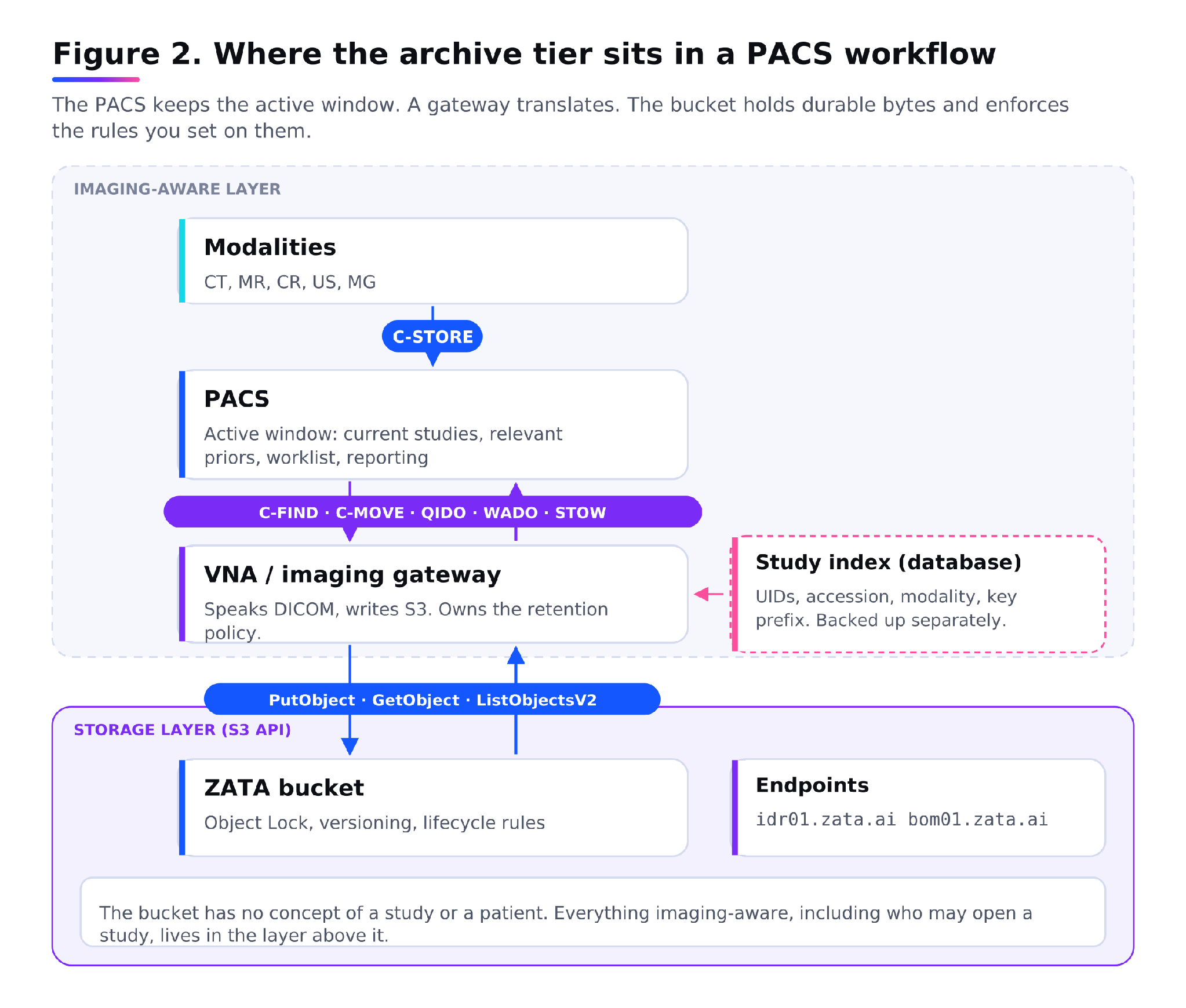
Figure 2. Where the archive tier sits in a PACS workflow.
Key design and the index that keeps studies findable
Object storage has a flat namespace. Keys look like paths because of the forward slashes, but there are no directories underneath, and ListObjectsV2 is a prefix scan, not a lookup. An archive with forty million objects cannot be searched by listing it.
A workable key layout mirrors the DICOM hierarchy and puts the stable identifier high in the prefix:
site01/2019/03/1.2.840.113619.2.55.3.2831217653/ | 1.2.840.113619.2.55.3.2831217653.1.1/ | 1.2.840.113619.2.55.3.2831217653.1.1.4017.dcm |
\
Site, then date partition, then Study Instance UID, then Series Instance UID, then the SOP Instance UID as the object name. Every retrieval that starts from a known study becomes a single prefix scan over a few hundred keys rather than a scan over the whole bucket.
The index is the other half, and it is the half that gets lost. A searchable archive needs a record per study holding the UIDs, patient identifier, accession number, modality, study date, instance count and the object key prefix. That record belongs in the VNA or PACS database, backed up on its own schedule and restorable independently of the bucket. Object tags and user metadata are useful for coarse routing, such as marking a prefix for a longer retention class, but they are not a query engine and they are a poor place for patient identifiers.
Treat the index as a first-class asset. Rehearse restoring it. An archive whose objects survive and whose index does not is a very large pile of unlabelled files, because the only remaining way back in is to read the header of every object and rebuild the catalogue.
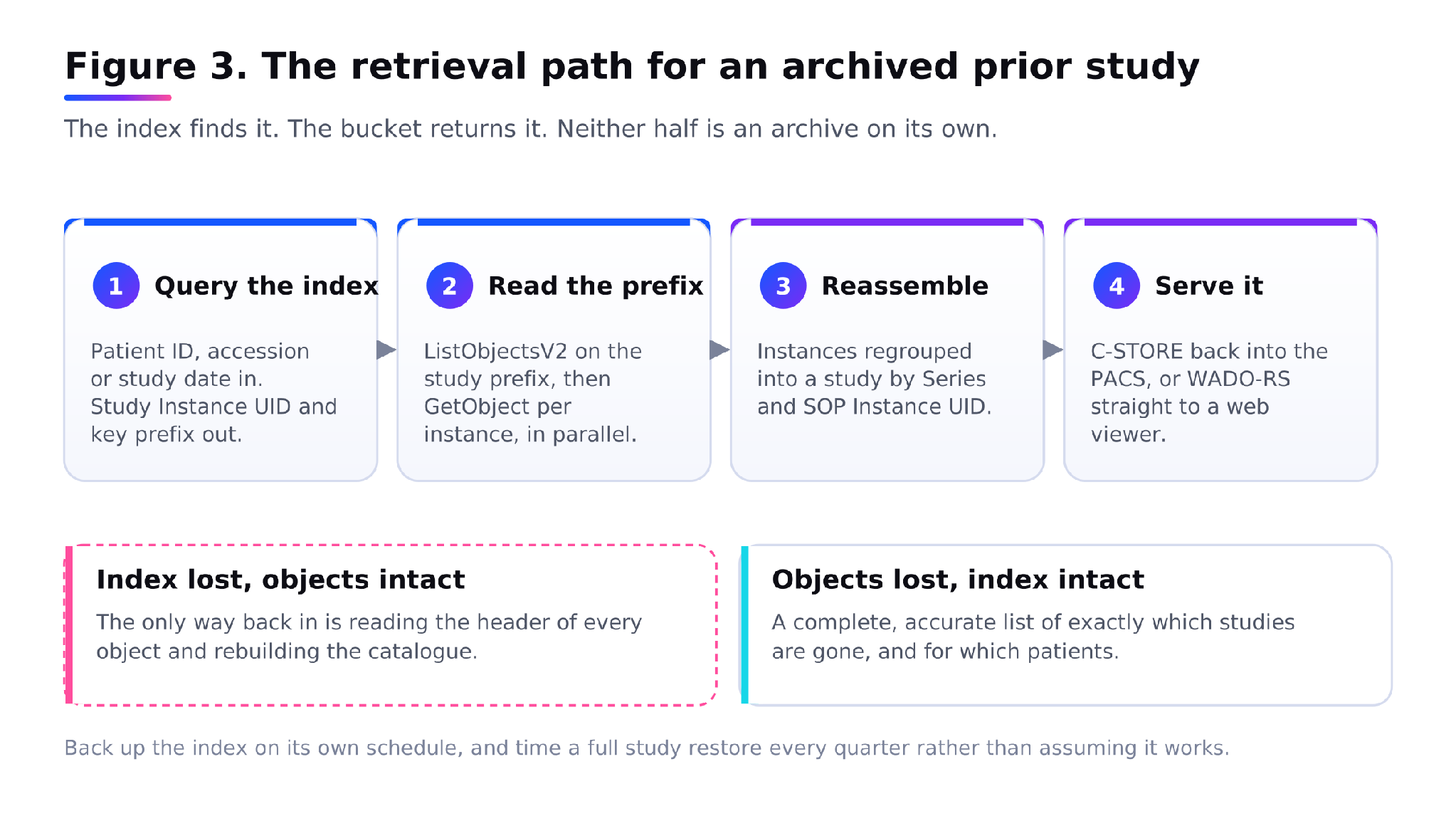
Figure 3. The retrieval path for an archived prior study.
Retention: what the law sets, what the bucket enforces
Retention in Indian healthcare comes from several directions at once, and none of them is a storage setting.
Regulation 1.3.1 of the Indian Medical Council (Professional Conduct, Etiquette and Ethics) Regulations, 2002 requires every physician to maintain the medical records of indoor patients for three years from the date of commencement of treatment. In states that have adopted the Clinical Establishments Act, 2010, the minimum standard for clinics requires records and statistics to be kept for at least three or five years, or in accordance with any other relevant Act.
Running the other way, the Digital Personal Data Protection Act, 2023 sets a storage limitation principle: personal data should not be kept longer than the purpose requires or a law demands. It does not prescribe a fixed retention period. Medico-legal cases, oncology follow-up and paediatric imaging commonly attract longer periods under state rules and accreditation standards. Confirm the periods that apply to your establishment with counsel rather than copying a figure from a vendor page.
What the storage layer contributes is enforcement of whatever period you decide.
- Versioning keeps earlier copies when an object is overwritten or deleted, so a mistaken delete removes a current version rather than the data.
- Object Lock enforces write-once-read-many retention. ZATA implements S3 Object Lock in two modes: Governance mode, where users cannot delete or overwrite a protected version or alter its lock settings without special permission, and Compliance mode, where a protected version cannot be overwritten or deleted by anyone until its retention period expires. Legal hold holds a version indefinitely until the hold is lifted, which is the control you want when a case is in litigation.
- Lifecycle rules expire objects or non-current versions after a set period, which is how you implement the ceiling rather than the floor.
Three operational details decide whether this works.
- Object Lock can only be enabled during bucket creation. It cannot be turned on for an existing bucket, and enabling it permanently turns on versioning. This is the detail that costs a migration. Decide the retention mode before you create the bucket, and expect to run separate buckets for separate retention classes.
- Compliance mode is genuinely irreversible for the retention period. That is the point of it, and it is also why putting an over-long retention on the wrong prefix is expensive: you cannot delete your way out, and you keep paying to store it.
- On a prepaid platform, retention is tied to the billing lifecycle, so the maximum lock period you can set is bounded by your account lifecycle. For a ten-year imaging retention policy, that is a commercial conversation to have before the architecture is signed off, not after.
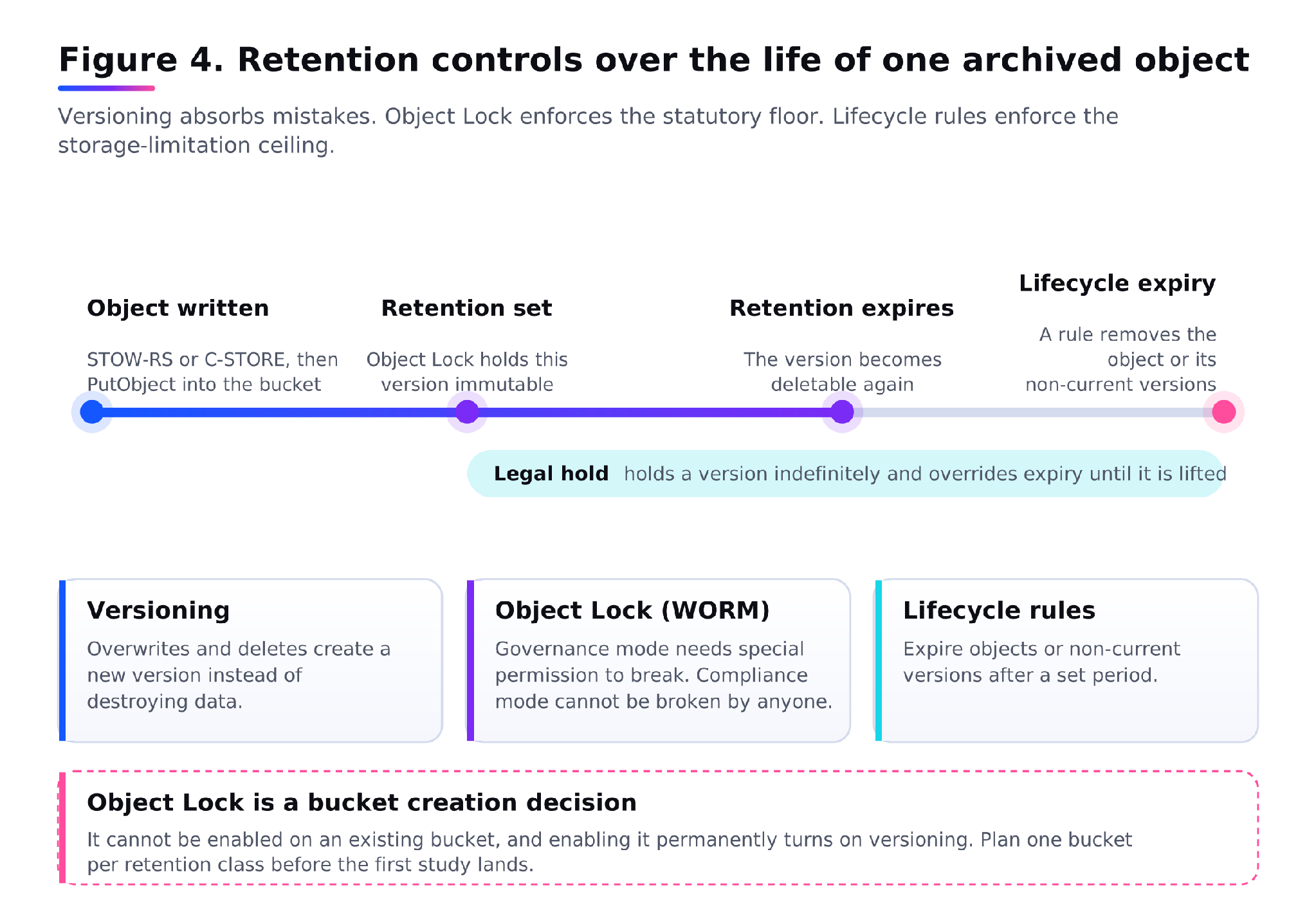
Figure 4. Retention controls over the life of one archived object.
Retrieval: getting a 2019 study back on screen
Archiving is easy to test. Retrieval is the part of medical imaging archive storage that fails quietly, usually at two in the morning when a patient arrives with a prior somewhere in the cold tier.
The path has four steps. A query hits the index, by patient identifier, accession or study date, and returns the Study Instance UID and key prefix. The gateway lists that prefix and issues GetObject for each instance. The instances are reassembled into a study and pushed back into the PACS with C-STORE, or served to a viewer over WADO-RS. The radiologist opens it alongside the current exam.
Several properties of object storage shape how this behaves.
- Objects are written and read whole. There is no partial update, so an instance is replaced rather than edited, and with versioning on, replacing it creates a version rather than destroying the original.
- Latency is per request, not per gigabyte. A study with 1,500 thin-slice instances is 1,500 GetObject calls. Parallelism, connection reuse and prefetching the whole prefix matter far more than raw link speed. Pulling a study serially over one connection is the single most common reason a cloud archive feels slow.
- Retrieval costs money on the way out. ZATA’s commercial model attaches an egress allowance tied to stored volume rather than metering every retrieval separately, which makes prior-study recall predictable in a way that per-GB retrieval pricing is not. Confirm the current allowance against your expected recall rate before you model the spend.
- Presigned URLs are the right way to hand an image to a viewer. A public ACL link works forever until you switch it off and can be forwarded, indexed by search engines or saved by anyone who opens it, whereas a presigned URL expires on its own. For patient data there is no version of the first option that is acceptable.
- Set a retrieval drill on the calendar. Pick a random study older than the active window each quarter, restore it end to end, and time it. An archive that has never been read from is an assumption, not a backup.
Access control, and where storage stops
Medical imaging archive storage gives you several access controls, and they are coarser than clinical access needs to be.
Access keys authenticate programmatic calls. On ZATA, an access key authenticates REST or Query protocol requests against the S3 service, and the endpoints are idr01.zata.ai and bom01.zata.ai. Those keys belong to the gateway service account, never to a workstation.
Subusers separate duties from the root account. The root user should be reserved for account and service management rather than routine tasks, with a separate user created for each person who needs access. Note the ceiling: ZATA allows three subusers per account, which is enough for service identities and an administrator, and not enough to model a radiology department. That is a sign of what the layer is for.
Bucket policies and ACLs scope what an identity can do to a bucket or a prefix. Useful for separating an ingest identity that can write but not delete from a retrieval identity that can read but not write. Not useful for expressing “this registrar may see this patient”.
Encryption in transit is the default on an HTTPS endpoint. Confirm the at-rest configuration and the key custody arrangement with ZATA in writing rather than inferring it.
Everything patient-specific happens above this line. The PACS or VNA authenticates the clinician, checks the relationship to the patient, decides whether the study may be opened, and writes the audit record that says who looked at what and when. The bucket sees a service account reading a key. It cannot tell you whether that read was clinically appropriate, and it cannot produce the access log a regulator will ask for. If your access audit trail lives only in storage access logs, you do not have one.
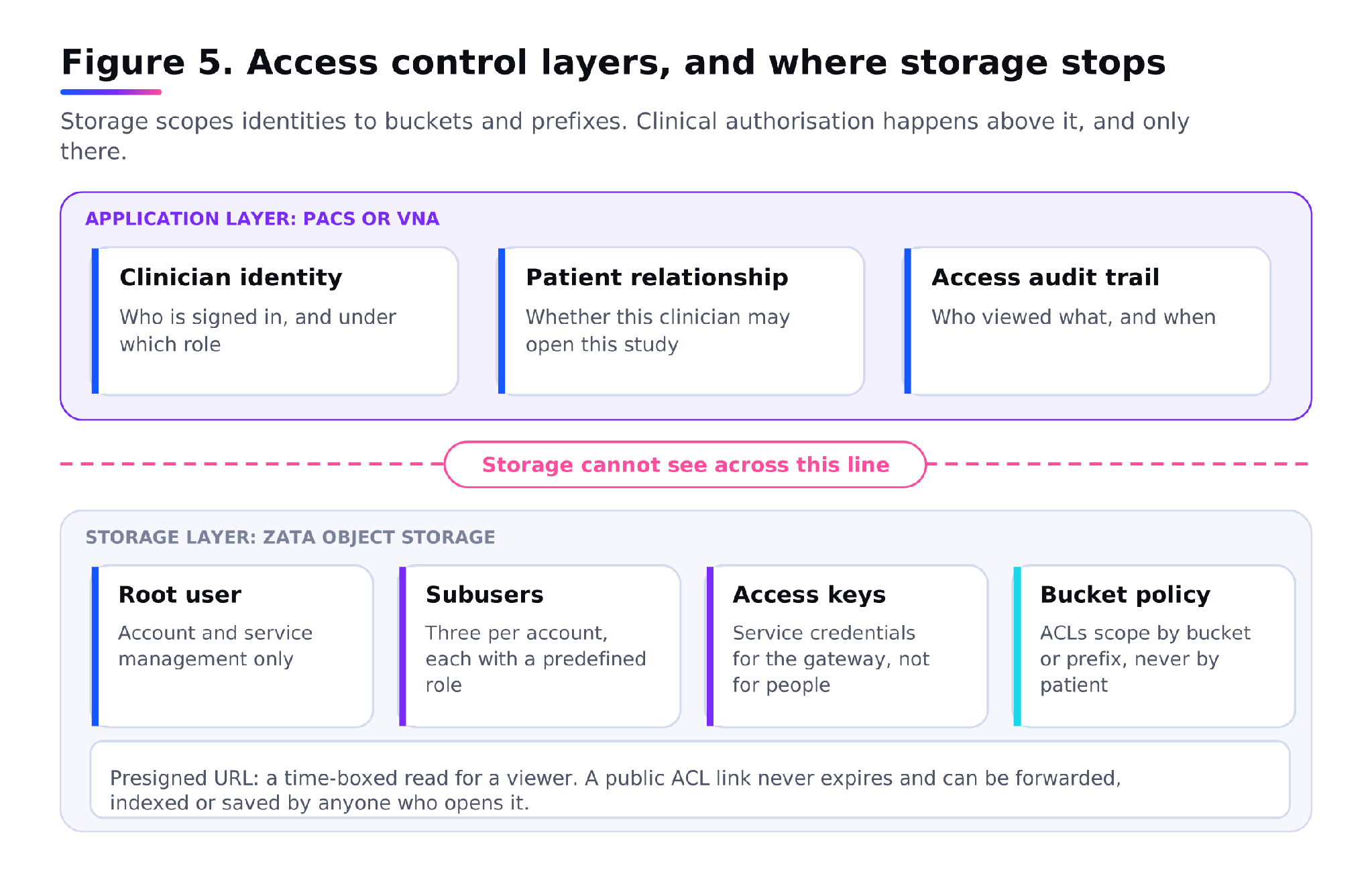
Figure 5. Access control layers, and where storage stops.
What to verify before the first study moves
| Criterion | Why it matters | What to verify |
|---|---|---|
| Object Lock mode | Cannot be enabled after bucket creation | Mode and default retention are set at creation, with a separate bucket per retention class |
| Maximum retention period | Lock period is bounded by the account lifecycle on prepaid plans | The longest period you need is contractually supported for its full term |
| Gateway or VNA | Object storage does not speak DIMSE or DICOMweb | Named product and version, with its DICOM conformance statement |
| Index backup and restore | A lost index makes intact objects unfindable | Index is backed up separately and a restore has been timed |
| Retrieval throughput | Latency is per object, not per gigabyte | A full study restore has been measured end to end, in parallel |
| Egress terms | Recall volume drives the running cost | Current allowance and overage terms, in the contract |
| Data residency | Residency is a stated requirement in most Indian health contracts | The endpoint region in use, written into the agreement |
| Access audit trail | Storage logs cannot show clinical appropriateness | Per-user, per-study access logging exists in the PACS or VNA |
| Exit path | Archives outlive contracts | A tested rclone or equivalent copy out, with the key layout documented |
Storage is one control, not a compliance posture
It is worth being blunt about this, because imaging vendors are not always. Object Lock in Compliance mode, encryption, versioning and an Indian region are real controls that a hospital’s data protection obligations can be built on. They are not themselves those obligations.
Under the DPDP Act, the hospital is the data fiduciary. Consent, purpose limitation, breach notification, the patient’s rights over their own records and the decision about how long a study is kept all sit with the establishment, not with the storage provider. A bucket can hold data for ten years. Whether it should is a clinical and legal determination made upstream. Any vendor presenting a storage feature list as a compliance answer is selling you half the problem.
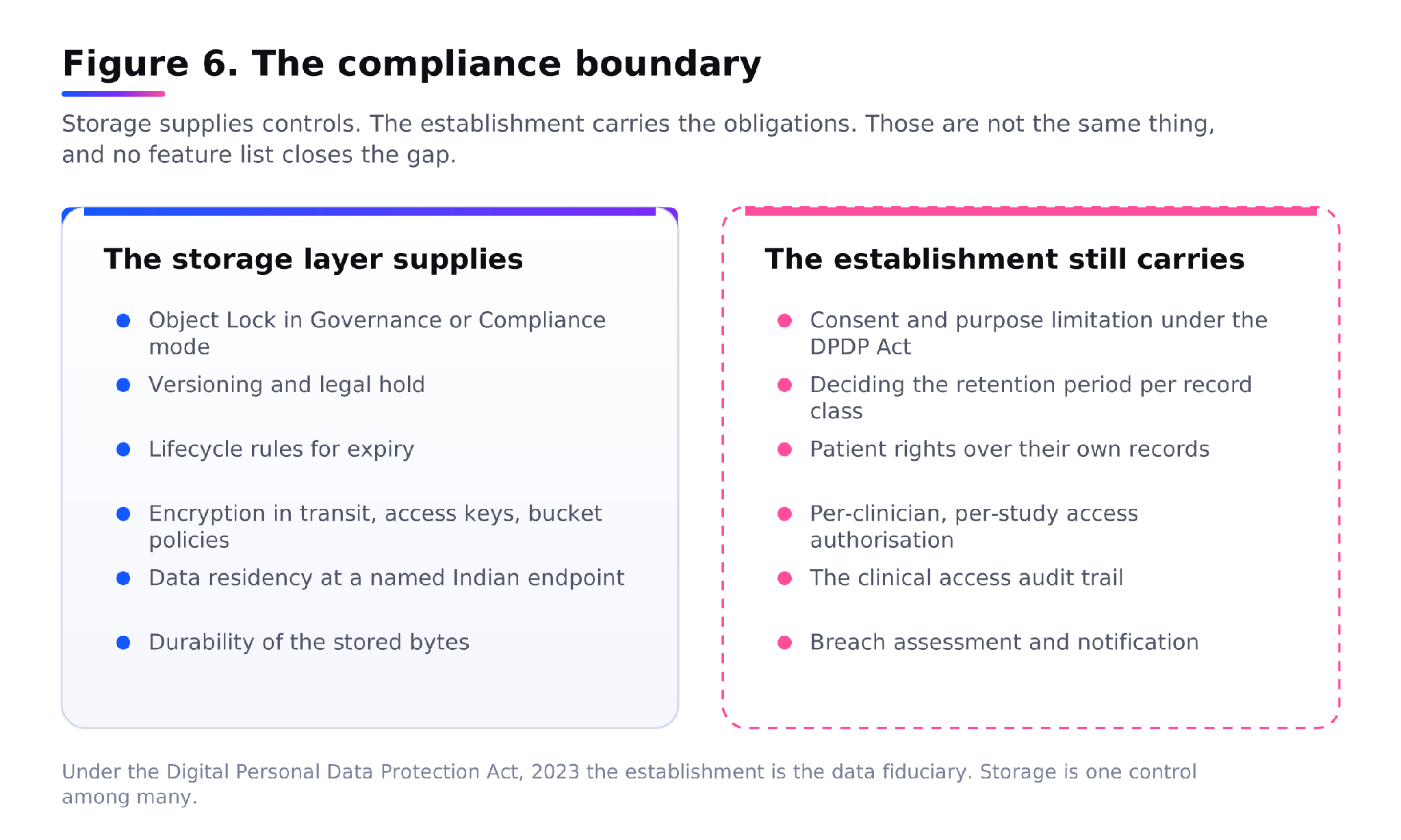
Figure 6. The compliance boundary.
ZATA’s long-term data archiving solution covers the storage tier of this architecture: S3-compatible buckets in Indian regions, Object Lock and versioning for retention, and lifecycle rules for the expiry side. Pair it with a VNA or imaging gateway for the DICOM-aware layer above it. |
Where to start
The decisions that are expensive to reverse are made early: whether Object Lock is on, which mode, how keys are laid out, and who owns the index. The decisions that look urgent, such as which tier and what it costs per terabyte, are the ones you can change later. Design the retrieval path first and work backwards to the medical imaging archive storage underneath it, because an archive is judged entirely on what comes out of it.
NEXT STEP
If you are scoping an imaging archive, start by mapping your current retention classes against the bucket structure they imply, then talk to the ZATA team about Object Lock configuration and retention terms for your longest period before any bucket gets created.
FAQs
How do you archive DICOM images without losing access to historical scans?
Keep three things together: the instances stored byte for byte as PS3.10 objects, a key layout built on the Study and Series Instance UIDs, and a separately backed-up index mapping patient and accession identifiers to those keys. The objects alone are not an archive. Test a full study restore on a schedule rather than assuming it works.
How long must an Indian hospital keep medical imaging records?
The commonly cited floor is three years for indoor patient records under regulation 1.3.1 of the Indian Medical Council Regulations, 2002, counted from the start of treatment. State clinical establishment rules, accreditation standards and medico-legal considerations often require longer. The DPDP Act sets a ceiling rather than a floor. Confirm the applicable periods with legal counsel.
Can object storage replace a PACS?
No. A PACS manages the imaging workflow, the worklist, reporting and clinical access. Object storage holds durable bytes behind an S3 API and has no concept of a study, a patient or a report. It serves as the archive tier beneath a PACS or VNA, which keeps the queryable index and handles the DICOM protocols.
What is the difference between a VNA and object storage for medical imaging archive storage?
A vendor neutral archive is imaging-aware software: it speaks DIMSE and DICOMweb, maintains the study index, and applies retention policy per modality. Object storage is the capacity layer underneath, addressed over S3. The VNA decides what to keep and where to find it; the bucket keeps it durable and enforces the lock.
Does S3 Object Lock satisfy medical record retention requirements?
Object Lock enforces a retention period technically, which supports a retention policy without being one. You still need a documented policy defining periods per record class, a legal hold process, an audit trail of clinical access, and a deletion process for data past its ceiling. Note that Object Lock can only be enabled when the bucket is created.
About the author
- Senior Technical Writer at NeevCloud, India’s AI First SuperCloud company. I write at the intersection of technology, cloud computing, and AI, distilling complex infrastructure into real, relatable insights for builders, startups, and enterprises. With a strong focus on tech, I simplify technical narratives and shape strategies that connect products to people. My work spans cloud-native trends, AI infra evolution, product storytelling, and actionable guides for navigating the fast-moving cloud landscape.
Comments
Join the discussionNo comments yet. Be the first to comment.
Active Archiving
Modern businesses generate massive volumes of data that must remain accessible, compliant, and cost-efficient over time. This series explores active archiving strategies for long-term data retention, compliance, and scalable cloud storage management. Through insights from ZATA, learn how organizations can optimize archive storage while maintaining accessibility, security, and operational efficiency.